This topic has been closed for replies.

3 replies

shawn_starc
Inspiring
March 19, 2019

Note that path > Restart your system > Go to that path and either rename or delete it. Then try to install Adobe XD

Participant
March 20, 2019

Hi
I tried, it does not work

Jeffrey_A_Wright
Legend
March 20, 2019

Pусланк416805, do you encounter any new errors while implementing the suggestions offered by Bani in message #2 of this public forum discussion?  I reviewed the e-mail address you used to post, and it does not appear that there is a Creative Cloud membership assigned too it.  What type of Creative Cloud membership are you using to install Adobe XD?

Bani Verma
Legend
March 19, 2019

Hi Pусланк416805,

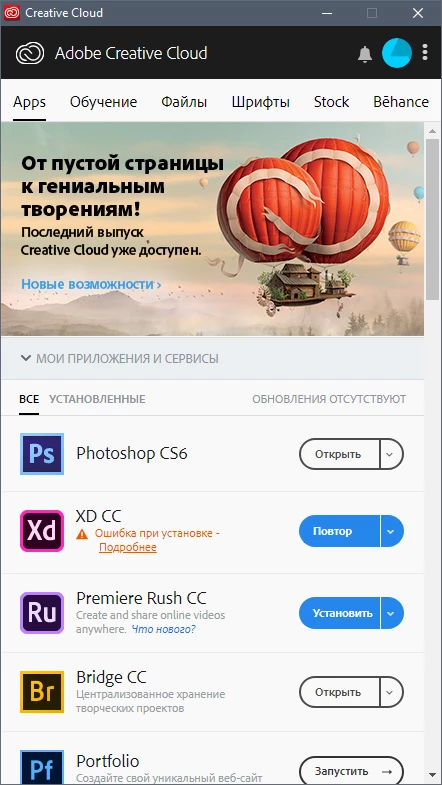
As per the screenshot attached you are unable to install Adobe XD as it fails with an error message 'Exit code 183'.

To resolve this issue, please try the steps shared in the following thread: Adobe XD CC installation problem. 

Let us know if this helps.

Participant
March 20, 2019

Hello!

there are no problems on the network, everything is in order on another PC on the same network!

Atul_Saini
Legend
March 19, 2019

Moving the discussion to Creative Cloud Download & Install​ forum.