Participant
August 13, 2015
Answered

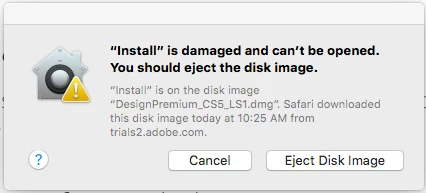
I downloaded CS5 Design Premium Suite to set it up on my Mac, but the installer failed. Message says "'Install' is damaged and can't be opened. You should eject the disk image."

  • August 13, 2015
  • 5 replies
  • 1727 views

I cannot open the CS5 Design Premium installer on my Mac running OS X. I get the attached error message. How can I install this software? I need to install it to deactivate it so I can set it up on a different computer.

This topic has been closed for replies.
Correct answer spentacular

Hey LaughingManArt and Megha Rawat.

I was able to fix the problem by creating a bootable USB drive from the downloaded .DMG file (which is still too overly complicated).

In disk utility, add a usb, and erase all the contents. Once that's done, you can double click the dmg to mount the adobe files. From there, you can go back to Disk Utility, and go to the second tier of the now erased USB (probably Untitled if you didn't rename it). Click restore, and then select the CD to restore from (I'm on El Capitan beta, so it's a few different steps for it). It takes a bit to restore, but once it's done, you can launch the install from the usb now.

Megha, for your tech team (if y'all even do anything).

Mid 2014 15" rMBP

2.5 GHz i7

16GB Memory

El Capitan Public Beta build 15A262e

Surprisingly, I can install both the CS4 and CS5.5 downloads, just not CS5, which is what leads me to believe the file is buggy if it's not booted from a disk.
5 replies

Participant
October 23, 2015

I got the same error. All you have to do is go to System Preferences > Security & Privacy > check "Anywhere" under "Allow apps downloaded from:"

However - now that I have it downloaded - it won't totally install.  After letting it run overnight, it was only 10% complete and seemed to be hanging up, with no error.  Not sure what is wrong.

chipm51458077
Participant
February 8, 2016

That's the winner! Thanks, Chari57

Megha Rawat
Participating Frequently
August 21, 2015

Hi Ryan,

Please check" PRIVATE MESSAGE".

Regards

Megha Rawat

Participant
August 22, 2015

I just downloaded CS5 design premium and get the exact same message. I've tried redownloading 3 different times (my download speeds are ~1gbs, it's not my internet). I believe something is wrong with the dmg uploaded.

Megha Rawat
Participating Frequently
August 18, 2015

Please try to create a new admin account.

Refer: https://support.apple.com/kb/PH18891?locale=en_US

How to Add Administrator Accounts to Your Mac (OS X)

Try to install it .

Regards

Megha Rawat

Participant
August 20, 2015

I setup a new admin on my Mac, redownloaded the install file, and again had the same error.

spentacularCorrect answer
Participant
August 24, 2015

Hey LaughingManArt and Megha Rawat.

I was able to fix the problem by creating a bootable USB drive from the downloaded .DMG file (which is still too overly complicated).

In disk utility, add a usb, and erase all the contents. Once that's done, you can double click the dmg to mount the adobe files. From there, you can go back to Disk Utility, and go to the second tier of the now erased USB (probably Untitled if you didn't rename it). Click restore, and then select the CD to restore from (I'm on El Capitan beta, so it's a few different steps for it). It takes a bit to restore, but once it's done, you can launch the install from the usb now.

Megha, for your tech team (if y'all even do anything).

Mid 2014 15" rMBP

2.5 GHz i7

16GB Memory

El Capitan Public Beta build 15A262e

Surprisingly, I can install both the CS4 and CS5.5 downloads, just not CS5, which is what leads me to believe the file is buggy if it's not booted from a disk.

Megha Rawat
Participating Frequently
August 14, 2015

Hi Ryan,

Please remove the disk image from disk utility and try to download the application again.

Kind Regards

Megha Rawat

Participant
August 18, 2015

I still have the same issue, I have redownloaded twice to no avail.

Participant
August 13, 2015

None of those helped, my installer fails to even start, so there is no log that has been created, I have downloaded the Cleaner, but there were no files for it to clean. I deleted libraries caches, which did nothing, and I downloaded and updated the Adobe Application Manager, which updated to the Adobe CC manager, which also does nothing (except allow me to install the CC Suite I pay for, but that is for another computer all-together).

I just need to deactivate this suite, which means I only need ONE working app, photoshop per say, but I cannot get anything to make it past opening the installer.