Participant
August 25, 2013
Question

I have a issue with installing Photoshop Creative Cloud, could someone kindly lend me a hand please?

  • August 25, 2013
  • 1 reply
  • 438 views

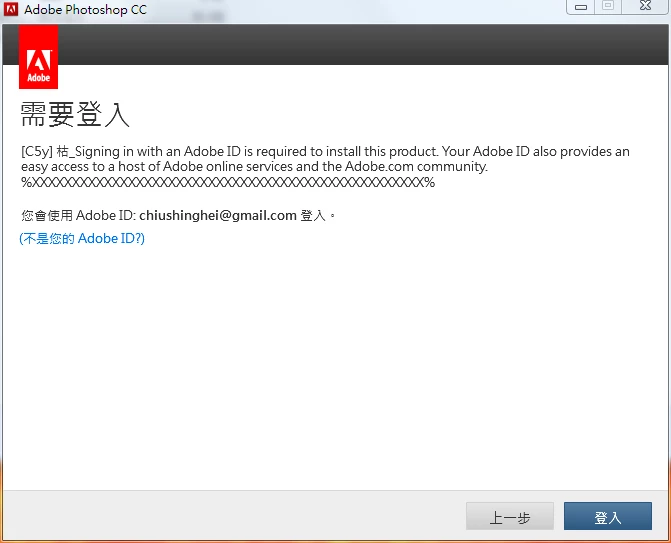
It happens to have something like this appers in both of the " Install " and "Trial" Screen, probably is a bug , I guess. Anyway, can someone explain to me why that occurs ? I want a way to fix it. Thanks .
I'm sorry, maybe you guys don't understand chinese, but I guess a " %XXXXXXXXXXXXXXXXXXXXXXX% " still looks weird in a screen where it should be asking to sign in, right ?
This topic has been closed for replies.

1 reply

kglad
Community Expert
Community Expert
August 25, 2013

is your creative cloud app running?  if yes, does it show you are signed in?

JasoncshAuthor
Participant
August 25, 2013

I don't mean to be rude or what, but to be honest, I don't care about the creative app running. Because I've been trying for a few days already, I tested it on other computers, they work fine, Adobe Photoshop Creative Cloud can still be installed in them.

kglad
Community Expert
Community Expert
August 25, 2013

if you follow all 7 steps you can dl a trial here:  http://prodesigntools.com/adobe-cc-direct-download-links.html

and activate with your adobe login

if you have a problem dl'g, you didn't follow all 7 steps.  the most common error involves failing to meticulously follow steps 1,2 and/or 3 (which adds a cookie to your system enabling you to download the correct version from adobe.com).