valterc93327906
Participant
February 18, 2016
Answered

I have a problem when i try install indesign CC - Error: 5

  • February 18, 2016
  • 2 replies
  • 469 views

I have a problem when i try install indesign CC - Error: 5.

Last week i change to windows 10.

How can i fix this?

This topic has been closed for replies.
Correct answer Bani Verma

The problem is not resolved...when i try open


I would suggest you to contact our technical support teams via chat/phone as they can remote in to your machine and help.

Contact Customer Care

**Be sure to remain signed in with your Adobe ID ( Email id used for purchasing the subscription ) before accessing the link above**

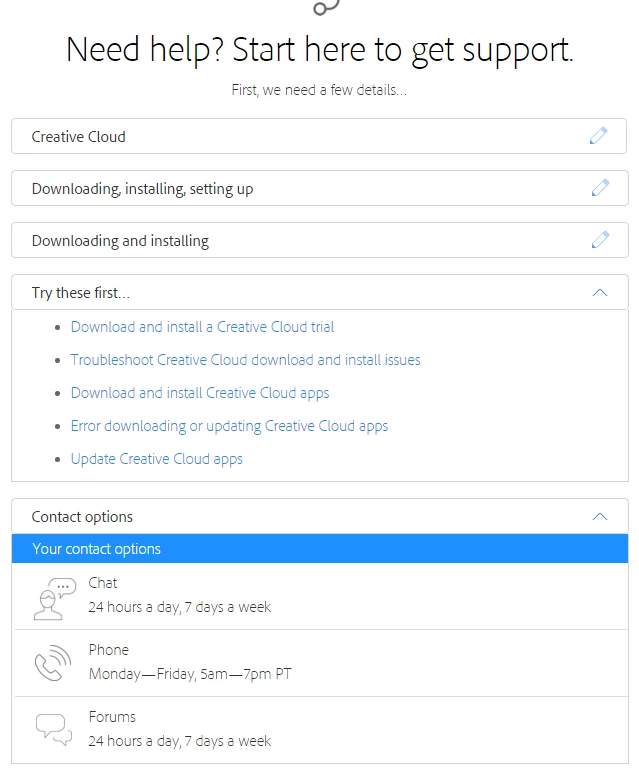
Select the exact options shown below in the screen shot to get support options:

2 replies

Robyn Rochat
Participant
March 28, 2016

I am having the same problem - I have spent 5 hrs today with technical support trying to remotely fix the problem and all in all spent 15 hours of my own time trying to get inDesign up and running - I am beside myself . . .  what now?

Bani Verma
Community Manager
Community Manager
February 18, 2016
valterc93327906
Participant
February 18, 2016

The error: 5 continuos, when i try open

Bani Verma
Community Manager
Community Manager
February 18, 2016

Please follow the below steps:

1- Please check if you have any browser security extensions installed, please disable them. ( Eg: AD BLOCK, Mcafee site/web adviser, internet security toolbar etc )

2- Also disable the Firewall of your machine see, Turn Windows Firewall on or off - Windows Help

3- Disable Firewall of the Internet security program installed on computer.

4- After this Sign out of Creative Cloud app Sign in and sign out to activate Creative Cloud apps

5- End Task from Task Manager in the same sequence as mentioned below:

  • Creative Cloud
  • Core sync & Core sync Helper
  • CC library & CCX processes
  • Adobe Desktop Common
  • Adobe Update daemon
  • Adobe IPC Broker
  • After this anything that says adobe on it do a force quit for it

6-  Uninstall Creative Cloud Desktop Manager  :

Creative Cloud Help | Uninstall the Creative Cloud desktop app

7- Delete following folders : ( If you don't see any folder skip that step )


  • C:\Program Files (x86)\Common Files\Adobe\OOBE
  • C:\Program Files (x86)\Common Files\Adobe\Adobe Application Manager
  • C:\Program Files (x86)\Adobe\Creative Cloud Folders
  • C:\Users\<user_name>\AppData\Local\Adobe\ AAM UPDATER  and OOBE both ( App data & Program Data is hidden folder please see, Show Hidden Files and Folders in Windows 7, 8.x, 10, or Vista  )
  • C:\Program DATA \Adobe\ rename the file SL-STORE as SL-STORE_OLD

8- Click on the below link and download Creative Cloud Installer file and use the same to install the Creative Cloud Desktop application.

Download Adobe Creative Cloud apps | Free Adobe CC trial

Let us know if this helps.

Regards,

Bani