Participant
May 19, 2015
Answered

I have cs6 master suite installed on my mac After Effects is now corrupt - I tried to reinstall.

  • May 19, 2015
  • 3 replies
  • 3311 views

I have cs6 master suite installed on my mac. At some point a hard disk corrupted and I had to reinstall some of the software from a backup (time machine).

Some of the programs do not run properly or even as in the case of After Effects open at all. Reinstalling adobe application manager allowed me to solve some problems but not all (e.g. After Effects not installed message).

I tried to run the installer again from my original disk with the following eror.
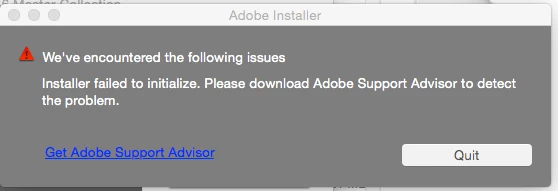
Downloading a new disk image gives the same error.

'Get Adobe Support Advisor' is now meaningless.

Any suggestions?

Maz

    This topic has been closed for replies.
    Correct answer Ned Murphy

    Adobe applications will not transfer properly, they need to be installed using installation files.  YOu can download the files thru the link(s) below.  You should uninstall whatever you can of what you currently have installed and then use the CS Cleaner tool.  After that you can reinstall.

    Adobe Creative Suite Cleaner Tool

    helps resolve installation problems for CS3 thru CS6 and for Creative Cloud

    http://www.adobe.com/support/contact/cscleanertool.html

    CS6 - http://helpx.adobe.com/x-productkb/policy-pricing/cs6-product-downloads.html

    You can also download the trial version of the software thru the page linked below and then use your current serial number to activate it.


    Be sure to follow the steps outlined in the Note: Very Important Instructions section on the download pages at this site and have cookies enabled in your browser or else the download will not work properly.

    CS6: http://prodesigntools.com/adobe-cs6-direct-download-links.html

    3 replies

    Ned Murphy
    Ned MurphyCorrect answer
    Legend
    May 19, 2015

    Adobe applications will not transfer properly, they need to be installed using installation files.  YOu can download the files thru the link(s) below.  You should uninstall whatever you can of what you currently have installed and then use the CS Cleaner tool.  After that you can reinstall.

    Adobe Creative Suite Cleaner Tool

    helps resolve installation problems for CS3 thru CS6 and for Creative Cloud

    http://www.adobe.com/support/contact/cscleanertool.html

    CS6 - http://helpx.adobe.com/x-productkb/policy-pricing/cs6-product-downloads.html

    You can also download the trial version of the software thru the page linked below and then use your current serial number to activate it.


    Be sure to follow the steps outlined in the Note: Very Important Instructions section on the download pages at this site and have cookies enabled in your browser or else the download will not work properly.

    CS6: http://prodesigntools.com/adobe-cs6-direct-download-links.html

    ftvartsAuthor
    Participant
    May 19, 2015

    I have done that (see original post) it is that installer that will not run.

    --

    Peter Marriott

    [personal information removed by moderator]

    Govardhan.V
    Participating Frequently
    May 19, 2015

    Did you renamed OOBE folder and reinstalled Adobe Application Manager ?

    Govardhan.V
    Participating Frequently
    May 19, 2015

    Follow below steps :

    Step 1)

    Launch Activity Monitor and "Force Quit" all the process related to Adobe like Creative Cloud, CoreSync, AAMupdater, AAMupdater notifier, Adobe Crash demon , PDAPP, install , setup... from Activity monitor.

    Step 2)

    1) Right click on Finder icon and  select "Go-To" Folder option.
    2) You will get a text box, type-in below command and then hit 'Return' key.

    /library
      3)Then navigate to Application Support>Adobe.

    Open Adobe folder and rename OOBE folder to OOBE-old.

    Step 3)

    Trash Adobe Application Manager folder from Applications>Utilities.

    Step 4 )

    Click on the below link and download Adobe Application Manager and install the same :

    http://download.adobe.com/pub/adobe/creativesuite/cc/mac/ApplicationManager9.0_all.dmg

    Once the installation process is completed, installation box will disappear, then open Application folder and locate Adobe Application manager launch icon , double click on it and update .

    Once the update is completed.

    Try to install After Effects CS 6 again .

    Note : it is better to copy the contents of disc to computer and then try to install .

    Mylenium
    Legend
    May 19, 2015

    Run the cleaner tool and start to reinstall with a clean slate.

    Use the CC Cleaner Tool to solve installation problems | CC, CS3-CS6

    Mylenium