


Inspiring
January 1, 2023
Answered

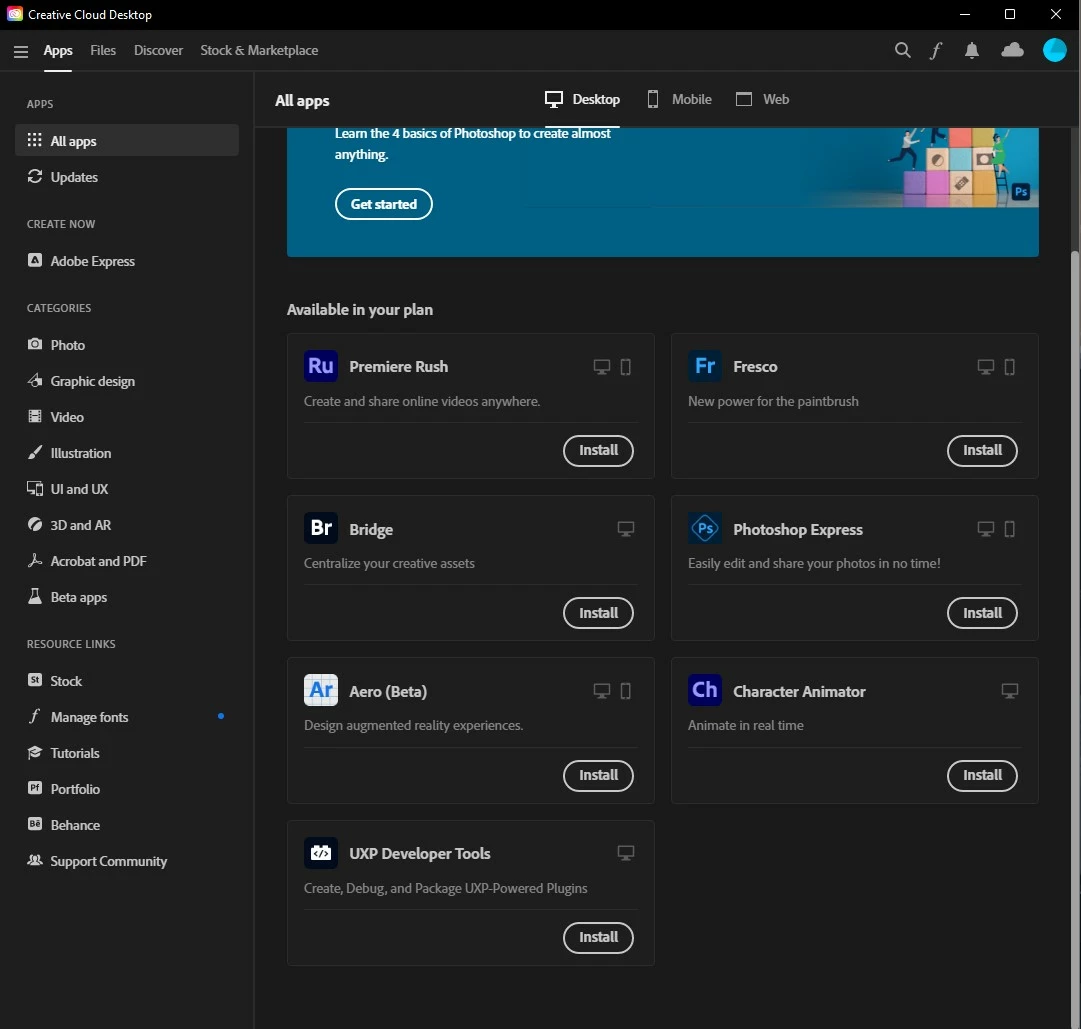
I have the plan with All the apps but majority of them don't show up in Creative Cloud Desktop.

  • January 1, 2023
  • 6 replies
  • 1916 views

I bought the plan but I can only see some of the apps and most of them don't show,I have tried everything including contacting the agents yet the issue still hasn't been resolved. I have tried logging in to my account from my old mac and when I do, I can see all the apps (Though I can't install any since the sytems is really old) but I can't see the apps from my main (Windows 11) PC. I also can't install the apps from the website because when I click install, it launches the Creative Cloud Desktop app but nothing happens.

Image for reference to how my apps look.
This topic has been closed for replies.
Correct answer Alienoir

Okay for anyone else having this problem I have solved it. The cleaner or the uninstaller doesn't finish the job so I manually went and looked for the adobe files and deleted all of them, only then when I Installed it again the apps were now visible!

6 replies

AlienoirAuthorCorrect answer
Inspiring
January 4, 2023

Okay for anyone else having this problem I have solved it. The cleaner or the uninstaller doesn't finish the job so I manually went and looked for the adobe files and deleted all of them, only then when I Installed it again the apps were now visible!

kglad
Community Expert
Community Expert
January 4, 2023

thanks for the update.

Jeffrey_A_Wright
Community Manager
Community Manager
January 2, 2023

Alienoir, in addition to the helpful advice you have received in this public forum discussion, please do not hesitate to use the process listed in https://helpx.adobe.com/x-productkb/policy-pricing/customer-support-portal.html to update your active support case ADB-27470222-K4T9 regarding this behavior.


The case will automatically close soon if we do not receive a response.

Legend
January 2, 2023

You haven't told us your Windows 11 system configuration. Please let us know about processor and RAM. Also, a long shot: is the computer in Windows-S mode?

AlienoirAuthor
Inspiring
January 2, 2023

It's Windows 11 22H2, Processor AMD Ryzen 5 3600X and 16 GB of Ram and no it is not on Windows-s mode

Nancy OShea
Community Expert
Community Expert
January 2, 2023

Log-in to your Adobe Account to confirm your plan is for Creative Cloud All Apps plan.

https://account.adobe.com/plans


Also ensure that your computer meets or exceeds the min-system requirements.  If it doesn't, you cannot access apps from Creative Cloud Desktop.


Most Creative Cloud apps work on:

  • Windows 11 (64-bit), Windows 10 versions 22H2, 21H2, 21H1;
  • MacOS 13 (Ventura), 12 (Monterey), macOS 11 (Big Sur).

- https://helpx.adobe.com/creative-cloud/system-requirements.html
- https://helpx.adobe.com/photoshop/system-requirements.html
- https://helpx.adobe.com/photoshop/kb/photoshop-cc-gpu-card-faq.html

1. Open CC Desktop App.
2. Click your Avatar (top right image) > Preferences > General tab > Settings. Select "Always keep Creative Cloud up to date."
3. Click on your Avatar again.
4. Sign-out of Creative Cloud.
5. Close all apps.
6. Restart your computer.
7. Open CC Desktop app.
8. Click your Avatar.
9. Sign-in with your paid ID and password.


Hope that helps.


Nancy O'Shea— Product User & Community Expert
AlienoirAuthor
Inspiring
January 2, 2023

Still does not work after checking everything.

Peru Bob
Community Expert
Community Expert
January 1, 2023

Does your computer meet the minimum requirements for the other apps?

https://helpx.adobe.com/creative-cloud/system-requirements.html


AlienoirAuthor
Inspiring
January 2, 2023

They do

kglad
Community Expert
Community Expert
January 1, 2023


uninstall every cc app per https://helpx.adobe.com/creative-cloud/help/uninstall-remove-app.html

then uninstall the cc desktop app, again using the correct uninstaller per https://helpx.adobe.com/creative-cloud/help/uninstall-creative-cloud-desktop-app.html#sa_src=web-messaging

clean your computer of cc files per http://www.adobe.com/support/contact/cscleanertool.html

check for, and if available, update your os

if windows is your os, repair all ms visual c++ versions that can be repaired (use google if you don't know how to do this)

if windows is your os update your ms visual c++, if it can be updated (use google if you don't know how to do this)

restart your computer (don't skip this)

reinstall the cc desktop app using*


*
use the "alternative download links" at the bottom of the page at https://helpx.adobe.com/download-install/kb/creative-cloud-desktop-app-download.html

use the desktop app to install your cc programs/trials

NOTE: win 11 users that have trouble with the latest win 10 installer often have success with the older win 10 installer.

AlienoirAuthor
Inspiring
January 2, 2023

I have tried this but this also does not work unfortunately.

kglad
Community Expert
Community Expert
January 2, 2023

@Alienoir 


did you install the older win 10 cc desktop app?