Participant
November 13, 2013
Answered

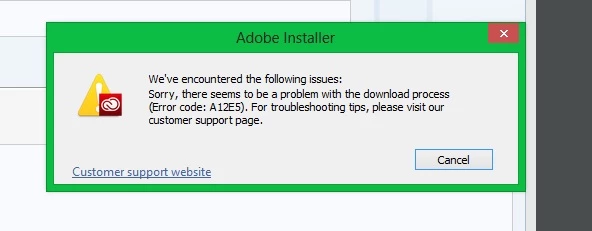
I have tried to download creative cloud various times and i keep receiving error code A12E5 help
  • November 13, 2013
  • 1 reply
  • 483 views

This topic has been closed for replies.
Correct answer Romsinha-9KMEUt

Hi Strangepurple,

I am sorry for the inconvenience you have been facing. Please try downloading from the direct link: http://prodesigntools.com/adobe-cc-direct-download-links.html.

Kindly follow the very important instructions before download.

Regards,

Romit Sinha

1 reply

Romsinha-9KMEUt
Adobe Employee
Adobe Employee
November 14, 2013

Hi SleepyHalloww,

Are you on a managed network. Please refer the kb: http://helpx.adobe.com/creative-cloud/kb/a12e1-error-downloading-creative-cloud.html.

Regards,

Romit Sinha

Participant
November 14, 2013

Hello,

I have also encountered this error and been unable to resolve. I am on Mac 10.8.5. I've tried running through every FAQ and troubleshooting measure so far without success. My latest attempt was to ensure root user was enabled and restart, this did not work. I've also used the CC cleaner tool to no avail. I've also renamed the one directory in my applications support to .old and finally, I've tried doing this on various other network connections. Is there anything other than the above that I could try? If someone could please let me know that would be a huge help because I am about to give up. Alternatively - if this is simply not able to work, is there any other method of getting Photoshop?

Romsinha-9KMEUt
Adobe Employee
Romsinha-9KMEUtCorrect answer
Adobe Employee
November 14, 2013

Hi Strangepurple,

I am sorry for the inconvenience you have been facing. Please try downloading from the direct link: http://prodesigntools.com/adobe-cc-direct-download-links.html.

Kindly follow the very important instructions before download.

Regards,

Romit Sinha