peterw62581472
Participant
June 12, 2017
Answered

Illustrator_Set-Up white screen

  • June 12, 2017
  • 3 replies
  • 1151 views

hey,

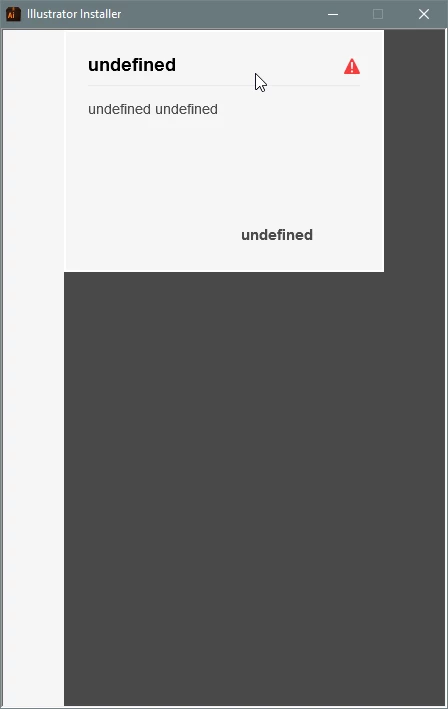
after a Win10 installation I tried to install the Illustrator again, but either the screen stays white or I get this error massage (well programmed!).

I tried the hint with the OOBE file but it did not worked.

Any other hints?

Cheers

Peter
    This topic has been closed for replies.
    Correct answer peterw62581472

    Peter please download and run the Adobe Creative Cloud desktop application uninstaller utility available at Uninstall the Adobe Creative Cloud desktop application .  If you continue to face difficulties then I would recommend completing the steps listed in "Failed to install" error received when installing Adobe Creative Cloud desktop app​.

    I appreciate the update that you are utilizing Windows 10.  My apologies for missing this information in the original post.  If running the Creative Cloud desktop app uninstaller utility and the steps listed in the document do not resolve the error then please update this discussion with the display settings and the type of display you are utilizing.


    YES!

    Thank you very much. I followed the steps

    Uninstall the Adobe Creative Cloud desktop application

    and now it works.

    3 replies

    Jeffrey_A_Wright
    Legend
    June 13, 2017

    Peter I am sorry that you are facing difficulty with the installation of Illustrator CC 2017 on Windows.  What version of Windows are you installing Illustrator CC 2017 on?  Do you have any other Adobe software installed on this computer?

    I would recommend reviewing the install log to determine if there are any specific errors causing this screen to occur Peter.  Details on how to locate the install log can be found at Creative Cloud download and install errors​.  Please update this discussion with any errors you discover.

    peterw62581472
    Participant
    June 13, 2017

    As I said before it is Win 10 (64bit) and I have flash and reader already installed.

    I checked the path C:\Program Files (x86)\Common Files\Adobe\Installers but there is no folder 'installers'.

    So, all the hints on the link are useless!

    Jeffrey_A_Wright
    Legend
    June 13, 2017

    Peter please download and run the Adobe Creative Cloud desktop application uninstaller utility available at Uninstall the Adobe Creative Cloud desktop application .  If you continue to face difficulties then I would recommend completing the steps listed in "Failed to install" error received when installing Adobe Creative Cloud desktop app​.

    I appreciate the update that you are utilizing Windows 10.  My apologies for missing this information in the original post.  If running the Creative Cloud desktop app uninstaller utility and the steps listed in the document do not resolve the error then please update this discussion with the display settings and the type of display you are utilizing.

    wrensauer
    Inspiring
    June 12, 2017
    _maria_
    Legend
    June 12, 2017

    Moving to Illustrator forum