
karena80588435
Participant
March 30, 2019
Answered

Indesign 14.0.1 won't open

  • March 30, 2019
  • 1 reply
  • 573 views

I just downloaded indesign and it refuses to open. Indesign's splash screen appears and then it closes by itself after a few seconds. I tried signing out and then back in to adobe creative cloud and even tried uninstalling it then reinstalling it. What should I do to fix this?
This topic has been closed for replies.
Correct answer Bani Verma

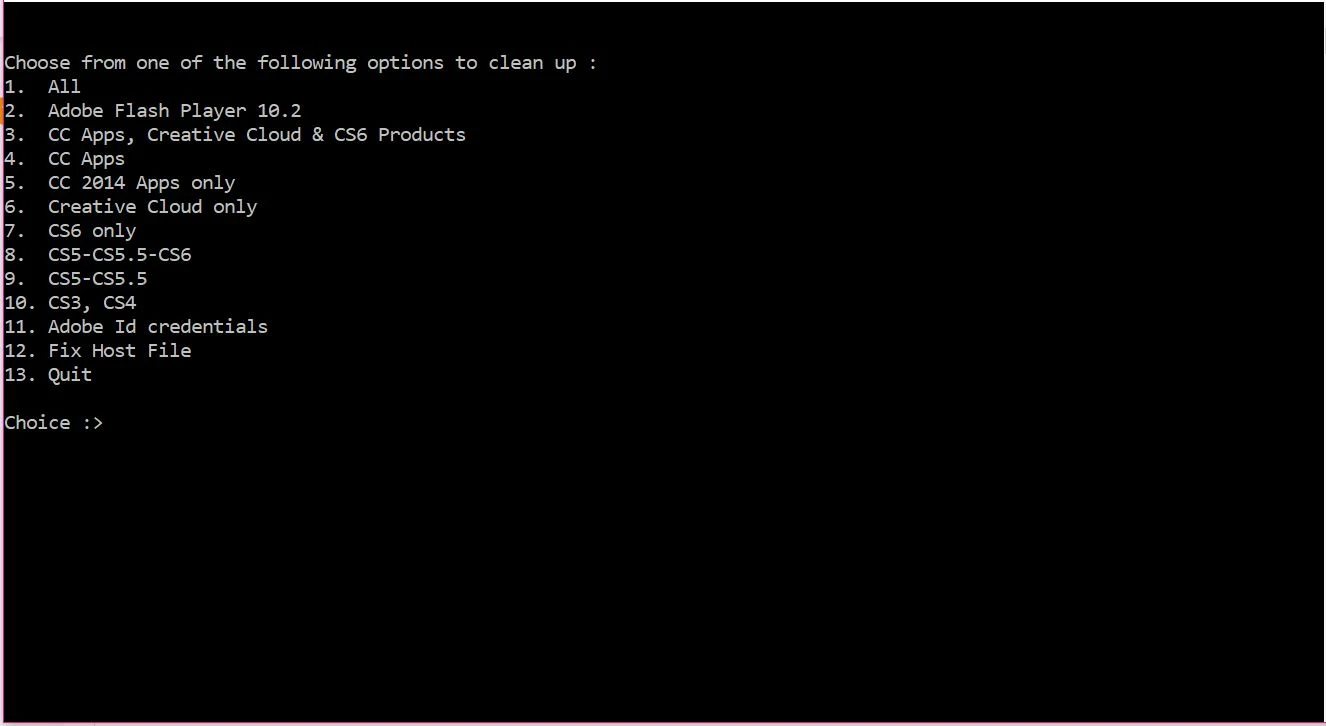
Didn't use Adobe cleaner yet as I don't know which option to select. Which one do I select?


Hi Karena80588435,

Please select option 4 in the Creative Cloud cleaner tool to get to the list of installed apps, select the number that shows next to 'InDesign' and then type 'Y' for yes to uninstall the app completely.

Let us know if you have any more queries.

1 reply

Derek Cross
Community Expert
Community Expert
March 30, 2019

Which OS?

Uninstall InDesign again using the drop-down menu in the Creative Cloud app and run Adobe Cleaner before reinstalling InDesign again Use the Creative Cloud Cleaner Tool to solve installation problems

karena80588435
Participant
March 30, 2019

I'm using Windows 10. Which option do I select to clean up?

Derek Cross
Community Expert
Community Expert
March 30, 2019

Open the Creative Cloud app and use the drop-down menu (looks like a gear icon) to uninstall InDesign.