Participant
October 26, 2021
Answered

Install drive change on update

  • October 26, 2021
  • 2 replies
  • 319 views

I have my Adobe programs installed on a secondary drive ("D").

On updates through clicking the Update button on Creative Cloud Desktop, why oh why does Adobe thinks it knows better than I do where I want my programs installed by installing it to my boot drive ("C")?

This just happened with updates of Photoshop 2021 to 2022. And now that I noticed it, I'm fairly sure it happened with Acrobat as well.

Just no, seriously!

This topic has been closed for replies.
Correct answer kglad

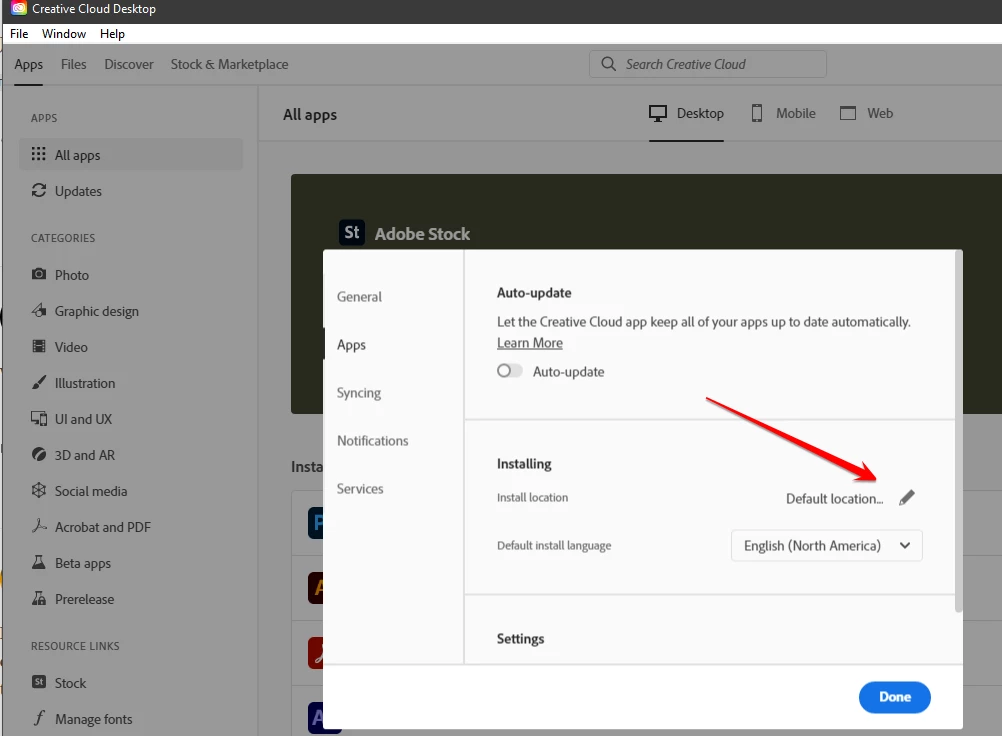
open your cc desktop app

click file>preferences>apps

check your install location


2 replies

ktchanAuthor
Participant
November 1, 2021

Thanks for all the responses

kglad
Community Expert
Community Expert
November 2, 2021

you're welcome.

kglad
Community Expert
Community Expert
October 26, 2021

was your install directory still the d drive or was that reset to default (c)?

ktchanAuthor
Participant
October 26, 2021

Lightroom Classic is still on D. Acrobat DC folder in C was created in September, Photoshop 2022 today. It didn't do that when Photoshop was upgraded from 2020 to 2021 (the leftover old installation folder are still there).

I haven't changed anything. I don't even know how to set it differently. It's an upgrade, not a fresh installation. It shouldn't change by itself.

kglad
Community Expert
kgladCommunity ExpertCorrect answer
Community Expert
October 26, 2021

open your cc desktop app

click file>preferences>apps

check your install location