
Steve.West
Participant
July 7, 2014
Question

Install error 502

  • July 7, 2014
  • 1 reply
  • 3875 views

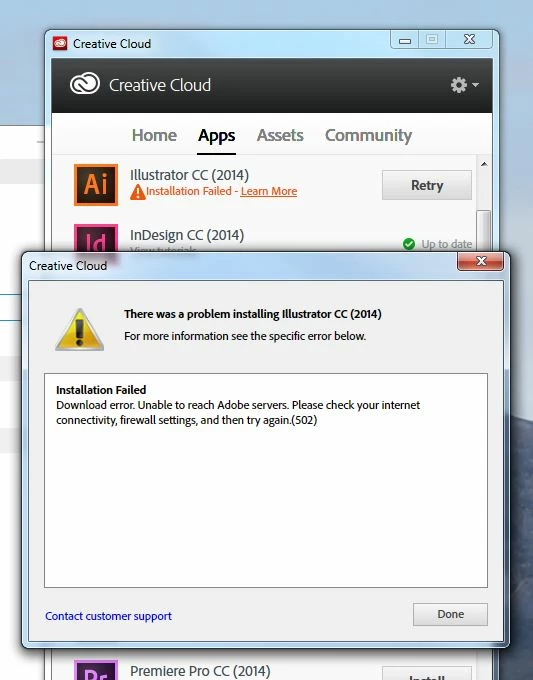
When trying to install Illustrator CC 2014 I get the following error:

Installation failed

Download error. Unable to reach Adobe servers.
Please check your internet connectivity, firewall settings, and try again. (502)

I have only  just installed Photoshop CC 2014 and updated Photoshop CS6 via the Creative Cloud updater, as well as other updates so believe that it must be the Illustrator installation that is at fault.

I have restarted both the updater and my computer.
This topic has been closed for replies.

1 reply

Jeffrey_A_Wright
Legend
July 7, 2014

Steve.West are you on a managed network?  I would recommend reviewing Error downloading Creative Cloud applications - http://helpx.adobe.com/creative-cloud/kb/error-downloading-cc-apps.html.

Steve.West
Participant
July 8, 2014

Hi Jeff,

Yes I am on a managed network.
I have completely uninstalled all Adobe software and run the CC cleaner tool. I am just waiting on the correct version (Win 7 64 bit Enterprise) of the creative Cloud desktop app from my administrator.

Unfortunately the page you sent me to didn't cover the error message I received. Please see my original post. I had no issues with Photoshop, Indesign, Acrobat; just Illustrator.
Cheers,

Steve

Jeffrey_A_Wright
Legend
July 8, 2014

Steve.West per Error downloading Creative Cloud applications please see the following: "If you are on a managed network, then see the Adobe Creative Cloud Service Access Documentation for IT section of Creative Suite Enterprise Deployment."