

Participant
February 23, 2015
Answered

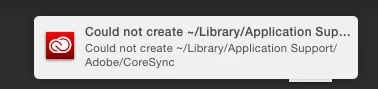
install error on Mac "could not create ~/library/application support/adobe/coresync"

  • February 23, 2015
  • 4 replies
  • 17253 views

Any reason why this would be happening and what I should do?
This topic has been closed for replies.
Correct answer stevenm29069276

Stevenm29069276 if you create a new local admin do you have the same issue?  This will help you determine if the file permission issue is User account or a problem with the Administrator group.


I¹ve created a new admin user and it works with that. So must be my profile

permissions?

4 replies

eduardav1337
Participant
January 2, 2017

THIS IS THE ONLY FIX

It's an permission issue:

open terminal in os x

copy this command into terminal :  cd ~/Library/Application\ Support

2nd command:   sudo chown -R username:staff Adobe

change "username" to your active username in your install of you mac.

you'll be prompted to type in your password if you have one.

et voila !

Run the installer again, if you have allready installed it, uninstall it via Applications > Utilities >adobe installers > unistaller creative cloud

Participant
January 27, 2017

Same problem solved with this! Thank you!  

Participant
January 30, 2017

I tried this and I get, cd: Too many arguments. Am I supposed to click something between the two commands? I tried clicking return but that didn't do anything.

Inspiring
April 15, 2015

is this the same "CC KILLER" related to the latest Yosemite update? (If so, could someone write this up in layman's terms?)

Participant
March 6, 2015

I'm getting this same error after trying to install on my mac pro.

I see that the cloud installer was able to create the ~/Library/Application Support/Adobe folder and a bunch of folders in side that, but it complains

about not being able to create the CoreSync folder.

I ran into this, then uninstalled everything, and nuked the ~/Library/Application Support/Adobe folder completely and started over.

The installed created the Adobe folder and "AAMUpdaterInventory", "AdobeApplicationManager", "Extension Manager CC", OOBE, SLCache, SLStore, Vulcan

folders just fine.  but it can't create the CoreSync folder in the same location.  

I'm stuck.

Participant
March 6, 2015

ok I was able to fix my problem.

I had to use the shell to go to ~/Library/Application\ Support/

and then chmod 775 Adobe

then it all worked.

pritesha17229422
Participant
July 25, 2019

this fixed my problem. thanks

Jeffrey_A_Wright
Community Manager
Community Manager
February 23, 2015

No Stevenm29069276 that is not expected behavior.  What changes occurred to the computer prior to this?  What operating system are you using?  Finally what steps have you implemented to resolve the error?

Participant
February 23, 2015

Seems to be a root access issue on my profile. I've logged in through system admin (which has root access) and have installed via this profile, however this doesn't flow through to my own profile.

Jeffrey_A_Wright
Community Manager
Community Manager
February 24, 2015

Stevenm29069276 if you create a new local admin do you have the same issue?  This will help you determine if the file permission issue is User account or a problem with the Administrator group.
