MRvC
Participant
November 11, 2015
Answered

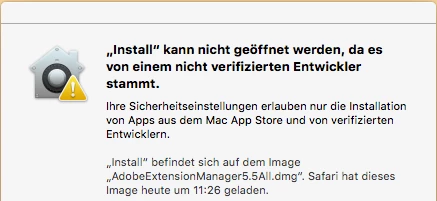
Installation Extension-Manager für Dremweaver CS5.5 auf MAC OSX Version 10.11.1

  • November 11, 2015
  • 3 replies
  • 19248 views

Der Installations-Versuch des gerade von der Adobe-HP geladenen Programms führt zu

was tun?

Danke.

Michael

This topic has been closed for replies.
Correct answer Govardhan.V

Follow below steps :

Set the Mac Gatekeeper setting to " AnyWhere" and then try to install .
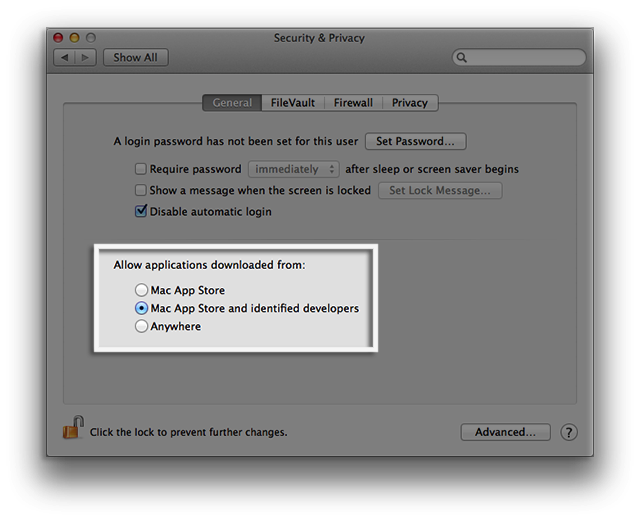
By Default , it will be set to Mac and Identified developer.

Click on Allow from Anywhere

and then try to install.  It shud work

Note :

Later you can revert back the changes made.

3 replies

carriem910
Participant
October 20, 2017

install from anywhere worked. i had this checked and the person at the apple store changed it. how do these ppl not know this stuff??

3 days of back and forth and finally up and running. THANK YOU!

Participant
May 8, 2018

Hey guys,

In my case is not working yet. I have already did the "anywhere " option. (even though my Mac does not have that anymore I changed in manually, FYI Terminal Commands: Allow Apps from Anywhere: sudo spctl --master-disable Reset Gatekeeper: sudo spctl --master-enable).

But still not working..... I even went to apple and they say is adobe the one helping me. I've spent hours on the phone and adobe only refers me to the Forums, with off course I've read all!!... Please help!!!

Thanks

Marcie

Participant
May 8, 2018

So After  sending this message I was able to finally talked to Adobe (super kind).

The solution was easier than I thought.

The installation file inside the Mac OS folder, just drag and drop it on a terminal window. And Voila!

I hope this helps other people.

Participant
December 6, 2015

Awesome! Thanks for helping, this was my issue as well.

Govardhan.V
Participating Frequently
December 7, 2015

You are welcome 

Participating Frequently
December 14, 2015

WOW!!!! That worked!! How come the customer service peeps don't know this?

Govardhan.V
Govardhan.VCorrect answer
Participating Frequently
November 11, 2015

Follow below steps :

Set the Mac Gatekeeper setting to " AnyWhere" and then try to install .

By Default , it will be set to Mac and Identified developer.

Click on Allow from Anywhere

and then try to install.  It shud work

Note :

Later you can revert back the changes made.

MRvC
MRvCAuthor
Participant
November 11, 2015

Thanks, it works!

Michael

Govardhan.V
Participating Frequently
November 11, 2015

Glad to hear that 

You are most welcome.