

Participant
February 17, 2022
Question

Installation issue with Photoshop Elements 2022

  • February 17, 2022
  • 1 reply
  • 249 views

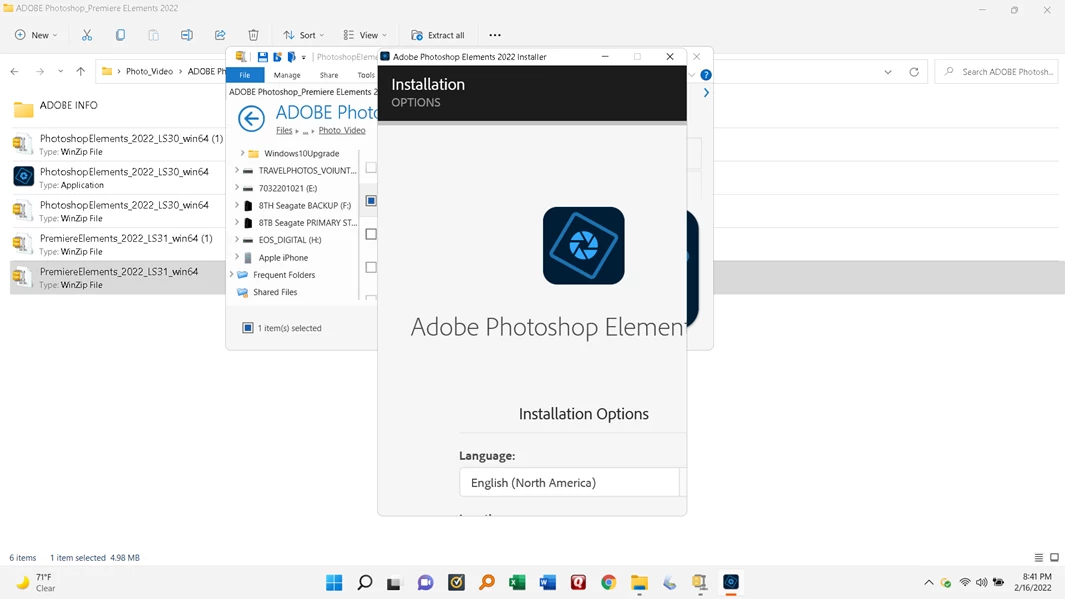
When I reinstalled Photoshop Elements 2022 I got this on my screen. which means I can't finish my installation. HELP/



This topic has been closed for replies.

1 reply

Jeffrey_A_Wright
Community Manager
Community Manager
February 17, 2022

Rpaul3rd, sorry you are unable to access the entire installer window.  Please adjust the scaling for Windows 11 to a lower setting.  You may want to consider using 100% depending upon the screen's resolution.   See https://support.microsoft.com/en-us/windows/view-display-settings-in-windows-37f0e05e-98a9-474c-317a-e85422daa8bb for information on how to adjust this setting.

rpaul3rdAuthor
Participant
February 17, 2022

I did as you suggested. At 100% for the display the installer splash screen
shows only about half of what it should show, only smaller. I have been
using 125% for the display for many years for many version of windows. Any
other suggestions? This appears to be a problem with the installer, not
with windows.

Paul Westpheling

[Personal information removed by moderator.]


Jeffrey_A_Wright
Community Manager
Community Manager
February 17, 2022

Rpaul3rd, you can try adjusting the display resolution and verify that any other display settings, such as font size, are using the standard settings.  If the scaling was changed, then other adjustments may have been made to make the display more comfortable.


Alternatively, you could try creating a new User account with default settings to complete the installation process for Photoshop and Premiere Elements 2022.