


Participant
March 24, 2021
Question

Installation of photoshop elements

  • March 24, 2021
  • 1 reply
  • 355 views

So, I just bought this package and installed it.  But during the install, the window that let me select a path and such didnt display correctly, almost like it was a HTML window but the CSS wasnt working.  But I hit enter, and it installed.


But, now that its installed, on to the next question.  I start the program and get the "What do you want to do?" screen.  So I click "Photo Editor", which is the only reason I bought the program.  And a new window pops up asking me to log into to adobe for some reason, but it has the same issue the install window had.  It looks like all the CSS is missing and nothing in the window is clickable.  so, Im stuck with a $99 paperweight.


Here's what it looks like (and yeah, nothing is clickable):
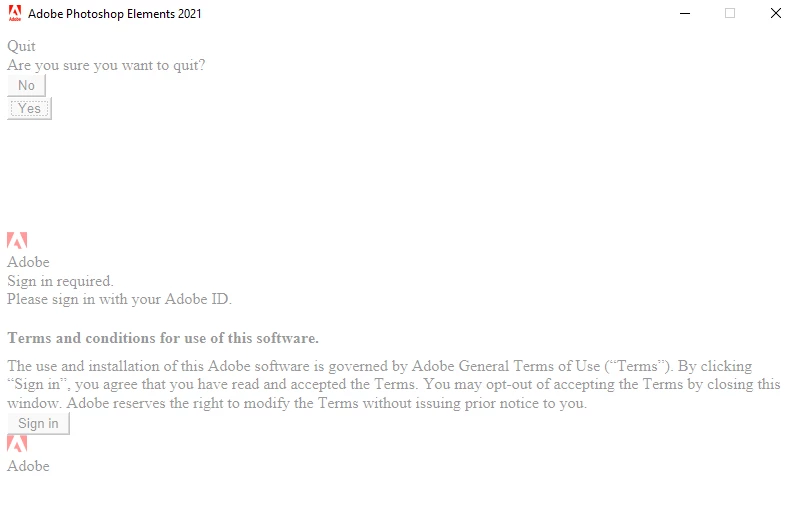


Honestly, I'd like to uninstall and re-install because i want to put it on a second drive.  But Id like to figure out what the heck is wrong before spinning my wheels.

This topic has been closed for replies.

1 reply

AxelMatt
Community Expert
Community Expert
March 24, 2021

Please reset the browser history and the cookies of your browser and tra again.

If this doesn't help try another browser and enable cookies.

My System: Intel i7-8700K - 64GB RAM - NVidia Geforce RTX 3060 - Windows 11 Pro 25H2 -- LR-Classic 15 - Photoshop 27 - Nik Collection 8 - PureRAW 6 - Topaz Photo AI
Rich5E6CAuthor
Participant
March 24, 2021

So, not sure how this is relevent, because its using whatever embedded web engine that Adobe is using in its program.  But, for the sake of arguments, I opened Chrome, Firefox, Safari, and Edge (I do some web dev and test in all browsers).  Clearing my cookies is going to be a pain for me over the next few weeks, but sure.


And no change at all.  I got rid of all cookies, cache, history for all 4 of the above browsers.  Went to open elements and it did the same thing again.


Here's a screenshot showing the persisting issue:


Legend
March 24, 2021

I think (but may be wrong) that the embedded web engine, offered by Microsoft, is controlled from the Internet Control Panel. It doesn't use your default browser.