Known Participant
June 16, 2015
Answered

Is there a link to re-install AE CC2014? I let the installer remove the prior version when installing AE CC2015 and now wish to also have CC2014 installed.

  • June 16, 2015
  • 2 replies
  • 711 views

I let the installer remove the prior version when installing AE CC2015 and now wish to also have CC2014 installed.

Thanks in a advance,

James Edmunds
    This topic has been closed for replies.
    Correct answer Michael Rochefort

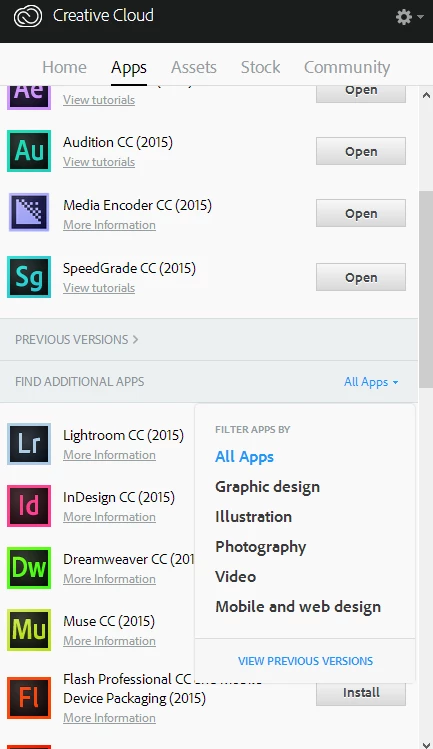
    When you open the creative cloud panel, on the "Find Additional Apps" section, click "All Apps" (right side) and select "Previous Versions".

    2 replies

    Participant
    June 18, 2015

    Thank you for this

    but for me i dont see the AE CC 2014

    i updated to 2015 and i need to go back to 2014

    please Help

    TX

    Ron

    Michael Rochefort
    Participant
    June 18, 2015

    WHich options do you see available to you? I'm going to guess CC and CC2014.1

    It may be that with the release of 2014.1 they removed 2014 after a while. But there should be drop downs for each individual program. Let me know what you find! (Currently away from computer)

    Mike

    Michael Rochefort
    Michael RochefortCorrect answer
    Participant
    June 16, 2015

    When you open the creative cloud panel, on the "Find Additional Apps" section, click "All Apps" (right side) and select "Previous Versions".

    Known Participant
    June 16, 2015

    Superb, thanks for quick and accurate reply. It's obvious, but I hadn't seen it. ;-)

    Michael Rochefort
    Participant
    June 16, 2015

    ‌Happy to help! This tripped me up the first time I updated CC (from CC to CC2014) so it's an easy enough mistake. I literally thought I lost all my work because of all the bugs at the time. Good luck with your comps!