



David Healy
Inspiring
December 30, 2021
Question

Is there a prompt to delete old versions of updated applications?

  • December 30, 2021
  • 2 replies
  • 5989 views

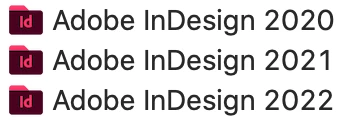
Is there a prompt when new versions of applications are installed in your system to remove the old ones. I don't look in my Applications folder very often but when I just did I saw old versions for each of the applications. Will it just keep adding without notifying me? 


This topic has been closed for replies.

2 replies

Fourteen
Inspiring
January 5, 2022

There's a couple of settings in the Creative Cloud desktop app that can be configurd to update to the latest versuon and remove your older apps. You can find the information about this here: https://helpx.adobe.com/creative-cloud/help/creative-cloud-updates.html#Autoupdate?product=Creative%20Cloud%20Desktop&product-version=5.6.0.788&mv=product&mv2=accc


That sounds like what you are looking for.


Althougb I agree with @Nancy OShea  I would keep older versions (especially of InDesign pre-2021) around till you're sure you don't need them. Otherwise you'll need to contact Adobe to get a link to download an installer to get them back.

David Healy
Inspiring
January 8, 2022

Thanks. Yes I backed up the old apps before deleting the ones on my main system.

Nancy OShea
Community Expert
Community Expert
December 31, 2021

I prefer to keep old versions until I'm certain I'll never need them again. Adobe no longer provides access to pre-2020 versions.


Open Creative Cloud Desktop App. Click the 3 dots icon and select Uninstall.

Repeat for other unwanted versions.


Nancy O'Shea— Product User & Community Expert