ITA - Aiuto! Non riesco ad installare nessun software dal Creative Cloud
Salve a tutti, spero possiate aiutarmi.
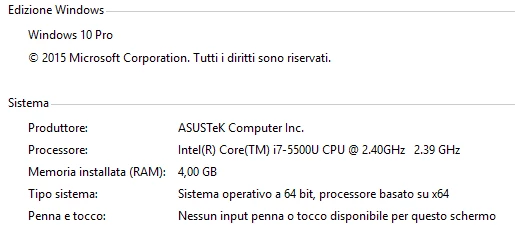
Sto provando ad installare la versione prova di Photoshop per poi procedere all'acquisto. Lavoro su un portatile nuovo di zecca con queste caratteristiche:
Ho installato Adobe Creative Cloud come da procedura. Aperto il Creative Cloud, premo sul pulsante "Prova" di fianco all'icona di Photoshop. Inizia a scaricare, poi a spacchettare, procede con l'installazione ma d'un tratto va a finire così:
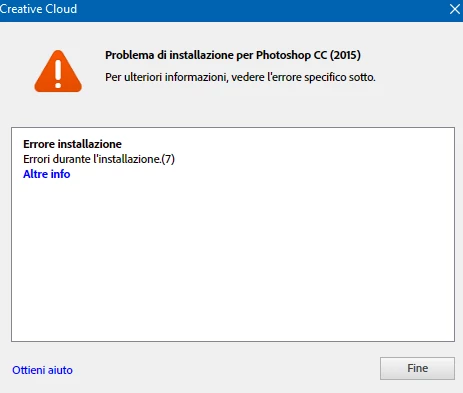
clicco su "Altre info" e il report dell'errore contiene questo testo:
-------------------------------------- Summary --------------------------------------
- 0 fatal error(s), 2 error(s) -----------
Payload: Adobe Preview CC 1.0.0.0 {A3B6E381-F2E8-47CD-87B4-96B1E3FF61D3} -----------
ERROR: DF024: Unable to move file at "C:\Program Files (x86)\Common Files\Adobe\Installers\adobeTemp\{A3B6E381-F2E8-47CD-87B4-96B1E3FF61D3}\_2056_d94c53616fc2e6a7ac56c1ece92dad40"
to "C:\Program Files\Common Files\Adobe\Plug-Ins\CC\Generator\preview.generate\node_modules\ws\build\Release\validation.node"
Error 32 Impossibile accedere al file. Il file è utilizzato da un altro processo..
Try setting correct permissions to the specified file/folder or parent folder, so that admin has rights to modify it.(Seq 2057)
----------- Payload: Adobe Photoshop CC 2015 Core 16.0.0.0 {793C2BF7-A4FE-4608-91C9-9282C5801C21} -----------
ERROR: DF024: Unable to move file at "C:\Program Files (x86)\Common Files\Adobe\Installers\adobeTemp\{793C2BF7-A4FE-4608-91C9-9282C5801C21}\_1285_88563a3f57959f9f20a8e11915e1f7cd" to
"C:\Program Files\Adobe\Adobe Photoshop CC 2015\Required\CEP\CEPHtmlEngine\libEGL.dll"
Error 32 Impossibile accedere al file. Il file è utilizzato da un altro processo..
Try setting correct permissions to the specified file/folder or parent folder, so that admin has rights to modify it.(Seq 294)
-------------------------------------------------------------------------------------
Cosa posso fare? Ho disinstallato tutto ciò che avevo installato di Adobe, ho fatto la pulizia con Adobe Cleaner Tool poi con CCleaner, riavviato, reinstallato Visual C++ ma niente. Sono circa al decimo tentativo. Ho provato anche con Indesign e Illustrator ma niente.
Aiuto!
 AdChoices