This topic has been closed for replies.

2 replies

AxelMatt
Community Expert
Community Expert
October 3, 2021

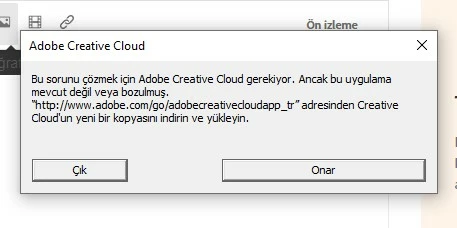
Pleased take a look here: Adobe Creative Cloud, needed to resolve this problem, is missing or damaged


If this doesn't help, please give us more informations including the following :

Adobe product and version number

Operating system and version number

The full text of any error message (s). Please write as text so we can translate it.

What you were doing when the problem occurred

Computer hardware, such as CPU; GPU; the amount of RAM; etc

My System: Intel i7-8700K - 64GB RAM - NVidia Geforce RTX 3060 - Windows 11 Pro 25H2 -- LR-Classic 15 - Photoshop 27 - Nik Collection 8 - PureRAW 5 - Topaz Photo
Participant
October 3, 2021

Merhaba. 3 Creative Cloud çalışmıyor. Silip tekrar yükledim. yüne çalışmıyor. donuyor. ekte yüklediğim hata uyarısı çıkıyor. Onar tuşuna basıyorum ama düzelmiyor. Bunu nasıl düzeltebilirim?

Nancy OShea
Community Expert
Community Expert
October 3, 2021

#1 Please ensure your computer meets or exceeds the minimum system requirements to run Creative Cloud + all other apps you use. Check each one.
- https://helpx.adobe.com/creative-cloud/system-requirements.html


Use the Cleaner Tools below to solve installation problems.

- https://helpx.adobe.com/creative-cloud/kb/cc-cleaner-tool-installation-problems.html


Uninstall and re-install Creative Cloud Desktop Application. 


Nancy O'Shea— Product User & Community Expert