Participant
March 9, 2020
Question

Latest Update Upload Issue

  • March 9, 2020
  • 2 replies
  • 286 views

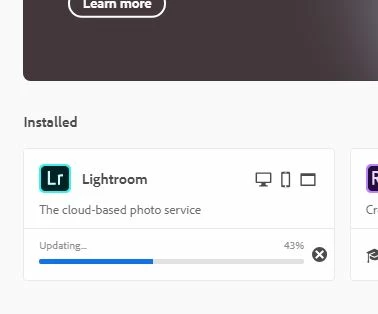
The latest update stops at 43% on my laptop. I have left the connection open over night 4 times now and it wont load past 43%. Anyone got a fix?

 

    This topic has been closed for replies.

    2 replies

    Participant
    March 16, 2020

    Did not work, deleted and cleaned as per instructions same problem currentlyhave no Lightroom stops loading at loading at the same point

    . Could be our slow internet connection. Will try a on a faster network or look for other option. 

    Jeffrey_A_Wright
    Legend
    March 16, 2020

    TheYeti, sorry that you continue to encounter problems with the update process.  Please check the log files to determine the error that is preventing the update process.  Once the exact error is known then a proper solution can be implemented.


    Please see  https://helpx.adobe.com/creative-cloud/kb/troubleshoot-download-install-log-files.html for information on how to locate the fatal errors within the log files.

    Community Expert
    March 9, 2020

    Please try a clean reinstallation by doing the following steps below: 


    if you're unable to install the cc desktop app at this stage, use an administrator account (solution 4 here, https://helpx.adobe.com/creative-cloud/kb/creative-cloud-missing-damaged.html 


    use the desktop app to install your cc programs/trials  


    My System: Intel i7-8700K - 64GB RAM - NVidia Geforce RTX 3060 - Windows 11 Pro 25H2 -- LR-Classic 15 - Photoshop 27 - Nik Collection 9 - PureRAW 6 - Topaz Photo AI