
Participant
December 1, 2013
Question

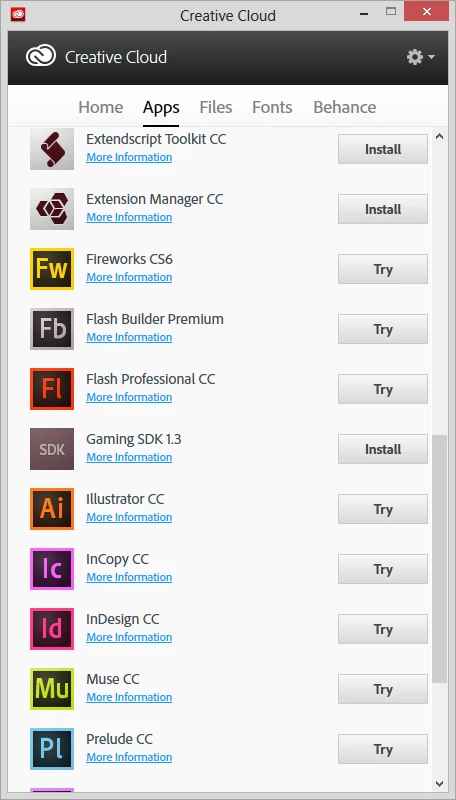
Lightroom 5 is missing from Creative Cloud's Apps List. Please help.

  • December 1, 2013
  • 4 replies
  • 1716 views

I've just subscribed to the Photoshop Photography program, installed Creative Cloud, installed Photoshop CC from there and could run it just fine, but I couldn't find Lightroom 5 in the list of apps that I could install from CC. Please help.
    This topic has been closed for replies.

    4 replies

    Participant
    June 8, 2014
    1. uninstall Lightroom 5 trial version
    2. sign out of Creative Cloud app
    3. sign in again in Crative Cloud app
    4. press install next to Lightroom 5

    > done :-)

    ArunPrasad
    Participating Frequently
    May 14, 2014

    Hello !

    Please Try this.

    Click on Gear icon (on Creative Cloud App) > General > Account > Sign out from Creative Cloud.

    Then Click on Gear icon (on Creative Cloud App > Quit Creative Cloud App.
    Delete the opm.db file.

    CC desktop lists applications as "Up to Date" when not installed

    Use the solution 2 on the link above to delete the opm.db file.
    Then SIgn into Creative Cloud App with correct Adobe id and password.

    You should see LR

    JMRLFC
    Participating Frequently
    June 14, 2015

    Didn't work & as for Lightroom only working in 64bit I have had the 32bit version installed for less than one month & I have paid for a years Creative cloud package ..So if I'm now being told I can't have lightroom then you can delete my account refund my money already paid period the end! Not everyone has 64bit eh!

    Inspiring
    May 13, 2014

    The same issue just turned up on my computer. It was there the other day but now it no longer shows up in the list. I've been with the CC for quite some time and it's always been there before. When I click on the home button it shows I updated LR 34 days ago, so I know it's not a system requirement issue.

    Rave
    Participating Frequently
    December 1, 2013

    Hi krio,

    If you're a paying Creative Cloud member, you may not see Lightroom in the Creative Cloud if your computer doesn't meet the minimum system requirements. Check to make sure that your system meets the minimum requirements for the latest release of Lightroom.

    If you're using a trial version of Creative Cloud, the Lightroom trial is not available through Creative Cloud. It is, however, available as a stand-alone trial. See Install Lightroom trial | Creative Cloud membership

    Note:

    Lightroom requires a 64-bit-compatible operating system.

    Creative Cloud only lists the application compatible to your system.

    Known Participant
    December 2, 2013

    I have the same issue. I just subscribed to CC for PS and LR and LR does not show up in my CC list of apps. I do have LR 5 and PS 6 previously installed on my computer and both still work. I will eventually uninstall them. But why isn't LR5 in my list CC apps?