



Oidige
Participant
December 6, 2019
Answered

lightroom 6 install error

  • December 6, 2019
  • 2 replies
  • 461 views

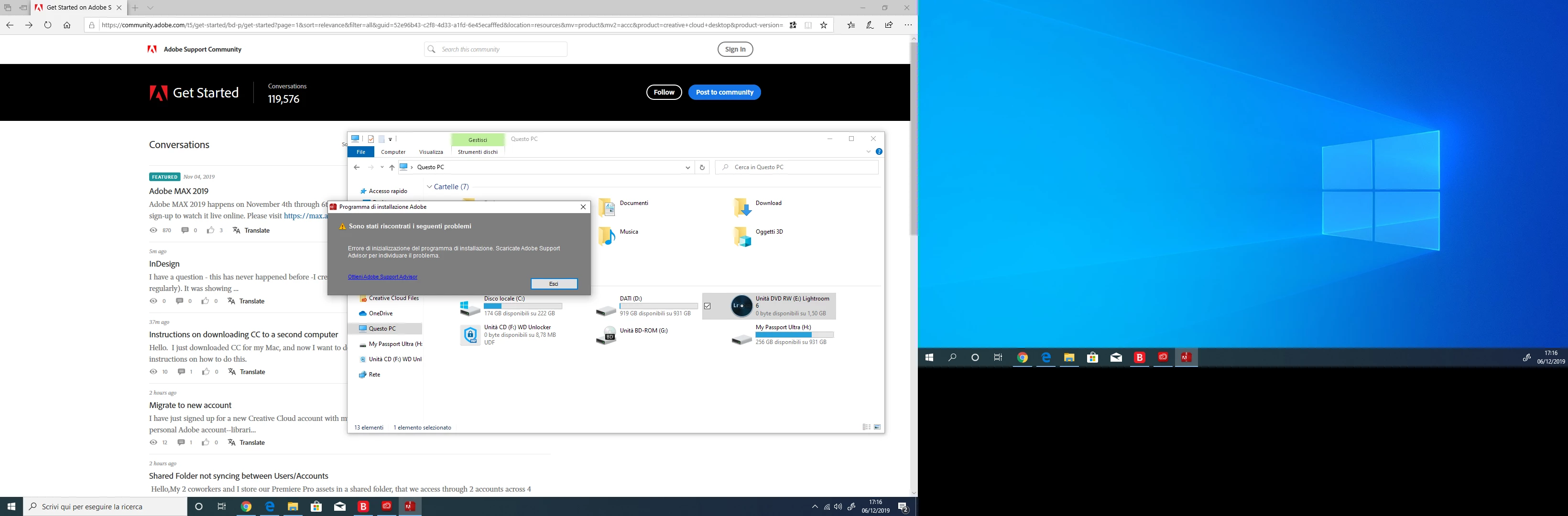
Hi everyone, I have a problem with installing lightroom 6 (windows 10 pro 64 bit operating system). Gives me the error you see on the photo I uploaded. You can help me (I searched for solutions in the forum, but I didn't find any) ?
This topic has been closed for replies.
Correct answer Oidige

Thanks for the help. I managed to install lightroom, uninstalling adobe creative cloud (the updated version). With the version of the cd lightroom installation disk runs. Good evening and thanks

2 replies

John T Smith
Community Expert
Community Expert
December 6, 2019

Should be compatible to install... however...


Two ideas that MAY work to install and/or run old programs in Windows 10
-RIGHT click the program icon or EXE and select a compatibility mode in the pop up option window
-and/or select Run as Administrator to assign FULL Windows permissions
-also https://helpx.adobe.com/x-productkb/global/create-local-administrator-account-windows.html

Oidige
OidigeAuthor
Participant
December 6, 2019

I try to do as you say, fingers crossed. We hope it works, good evening and thanks

Oidige
OidigeAuthorCorrect answer
Participant
December 6, 2019

Thanks for the help. I managed to install lightroom, uninstalling adobe creative cloud (the updated version). With the version of the cd lightroom installation disk runs. Good evening and thanks

John T Smith
Community Expert
Community Expert
December 6, 2019

Picture is too small to read... what does the message say?

Oidige
OidigeAuthor
Participant
December 6, 2019

installation program initialization error. download adobe support advisor to identify the problem.