Participant
July 23, 2018
Answered

Lightroom CC won't open or redownload

  • July 23, 2018
  • 1 reply
  • 1119 views

Has anyone had issues with Lightroom CC recently? I have been using it fine on my laptop(windows 7) for the last year and a half, but it won't open suddenly. I looked through some discussions and deleted the lightroom file to redownload. However, its saying Windows 10 is required for Lightroom CC (error 190). If anyone has had this issue please help

This topic has been closed for replies.
Correct answer Jeffrey_A_Wright

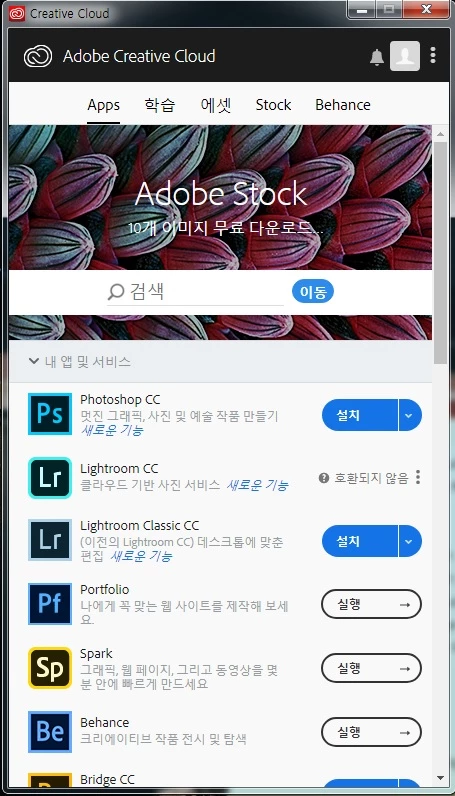
Hey Jeff. Thank you for providing that solution for it was exactly what I was looking for. However, my Adobe CC is showing the Lightroom option as "Not Compatible" (its in Korean) instead of showing up as an "Install" button where I can look through different versions. What should I do to make the "instal" button show up? (The Photoshop CC and Lightroom Classic CC are showing the options. Just not Lightroom Classic CC). Thank you.


Alexander7962, if you click on the three dots are you then given the option to install an "Other Version?"  If you do not see the option, then please check Preferences within the Creative Cloud desktop app.  Show older versions must be turned on under Preferences>Creative Cloud>Apps.

1 reply

Akash Sharma
Legend
July 23, 2018

Hi Alexander7962,

Sorry that Lightroom CC app suddenly won't open on your computer and it won't re-download now after you've uninstalled it as it is showing up error core 190.

I am moving this discussion to Creative Cloud Download & Install​ community so that our experts can help you to reinstall the app.

Regards,

Akash

Participant
July 23, 2018

I think the problem was that I had the older version of Lightroom CC before and upgraded it when Adobe Creative Cloud suggested so. I'm not sure why this affected my laptop (Windows 7) and the Lightroom CC program now since I already had been using it for the last year and a half.

I have been paying for the Adobe subscription for the two and a half years and not being able to use Adobe Lightroom anymore is a major issue for me. Is there any way my subscription would allow me to download an earlier version of Lightroom CC that works on Windows 7? (ex: Lightroom 6)

Thank you,

Alexander Yoon

P.S: I really do wish that the Creative Cloud would have recognized that my system was a Windows 7 and not a 10 before suggesting an update. Not trying to be rude but, I do think it would be absurd if this update left me with no choice in not being able to use Lightroom.

Jeffrey_A_Wright
Legend
July 23, 2018

Alexander7962, sorry you are facing Error 190 while attempting to utilize Lightroom CC.  You are correct that the error indicates that the minimum system requirements are not met.  Would it be possible for you to upgrade the current computer to Windows 10?  The current hardware will likely support the operating system if you were previously running Lightroom CC.

If you are unable to upgrade then you can use the Adobe Creative Cloud desktop application to choose to install an older version of Lightroom as part of your membership.  Information regarding the process can be found at Learn how to download your Adobe Creative Cloud apps .

Please update this public discussion if you have any questions.