haylebob1762
Participating Frequently
July 7, 2018
Answered

Lizenzprüfung mit Adobe Applicationmanager schlägt fehl

  • July 7, 2018
  • 2 replies
  • 2757 views

Hallo,

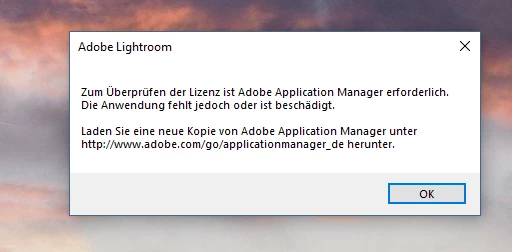
seit heute kommt bei jedem Start von LR oder PS die Meldung

"zum Überprüfen der Lizenz ist Adobe Application Manager erforderlich,

Die Anwendung ist jedoch beschädigt oder fehlt Laden Sie von Adobe

Application Manager unter http://www.adobe.com/go/applicationmanader_de

herunter!".

gesagt getan, leider geht das nicht, mehrfache installation des Application Manger

bringen keine Abhilfe,

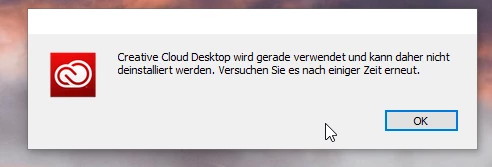
Deinstallieren geht auch nicht es kommt die Meldung

"Creative Cloud Desktop wird gerade verwendet und kann nicht installiert werden..."

Was kann ich noch tun um dies Fehlermeldung loszuwerden?
viele Grüße

Michael

This topic has been closed for replies.
Correct answer kglad

uninstall everything cc including preferences, https://helpx.adobe.com/creative-cloud/help/uninstall-remove-app.html

then uninstall the cc desktop app, https://helpx.adobe.com/creative-cloud/help/uninstall-creative-cloud-desktop-app.html

clean your computer of cc files per http://www.adobe.com/support/contact/cscleanertool.html

restart your computer (don't skip this)

reinstall the cc desktop app, https://creative.adobe.com/products/creative-cloud.

if you're unable to install the cc desktop app at this stage, use an administrator account (solution 4 here, https://helpx.adobe.com/creative-cloud/kb/creative-cloud-missing-damaged.html)

use the desktop app to install your cc programs/trials

2 replies

haylebob1762
Participating Frequently
July 7, 2018

Hello,

thank you it works.

Michael

kglad
Community Expert
Community Expert
July 7, 2018

you're welcome.

Participant
December 28, 2020

Hi There,- what about plug-ins and preferences? Thank you,

kglad
Community Expert
kgladCommunity ExpertCorrect answer
Community Expert
July 7, 2018

uninstall everything cc including preferences, https://helpx.adobe.com/creative-cloud/help/uninstall-remove-app.html

then uninstall the cc desktop app, https://helpx.adobe.com/creative-cloud/help/uninstall-creative-cloud-desktop-app.html

clean your computer of cc files per http://www.adobe.com/support/contact/cscleanertool.html

restart your computer (don't skip this)

reinstall the cc desktop app, https://creative.adobe.com/products/creative-cloud.

if you're unable to install the cc desktop app at this stage, use an administrator account (solution 4 here, https://helpx.adobe.com/creative-cloud/kb/creative-cloud-missing-damaged.html)

use the desktop app to install your cc programs/trials