Participant
April 19, 2020
Answered

[Locked, wrong forum] Converting all of our showhide xtype Classic UI dialogs to Touch UI [AEM]

  • April 19, 2020
  • 2 replies
  • 644 views

Hi,

We're in the process of converting all of our Classic UI dialogs to Touch UI using the dialog conversion tool. We're using the showhide xtype in a lot of our form field components and we're looking for an equivalent or alternative widget for the Touch UI. Any suggestions?


Description about showhide xtype widgets:-

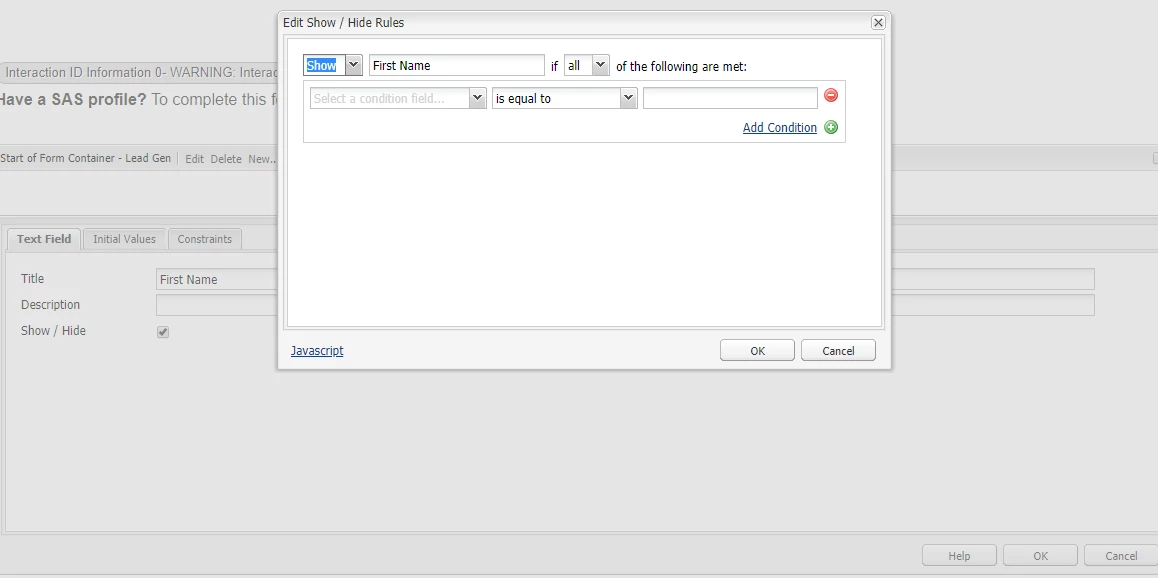
I'm referring to the specific showhide xtype which handles show/hide logic for the HTML elements in a web form, not widgets in a dialog. The values captured in this xtype are passed along to the Abacus JS which handles form logic for components that extend OOTB form field components. Below is a screenshot of the showhide xtype. Clicking that checkbox in the background dialog opens the 2nd dialog that allows authors to configure show/hide logic for elements that are present on the web form.

For Example: below is the screenshot of dialog of showhide.


Thanks a lot in adavance.

Jeetendra

This topic has been closed for replies.
Correct answer John Waller

You've posted in the Creative Cloud forums.


The Adobe Experience Manager forums are at

https://experienceleaguecommunities.adobe.com/t5/adobe-experience-manager/ct-p/adobe-experience-manager-community


Unfortunately the two forums are not linked so we cannot move your post so you'll have to re-post your question to the link above.

2 replies

Just Shoot Me
Legend
April 19, 2020

I moved your post over from the poorly named Community Help forum to a better forum.

John Waller
Community Expert
John WallerCommunity ExpertCorrect answer
Community Expert
April 19, 2020

You've posted in the Creative Cloud forums.


The Adobe Experience Manager forums are at

https://experienceleaguecommunities.adobe.com/t5/adobe-experience-manager/ct-p/adobe-experience-manager-community


Unfortunately the two forums are not linked so we cannot move your post so you'll have to re-post your question to the link above.