
Participant
October 8, 2018
Answered

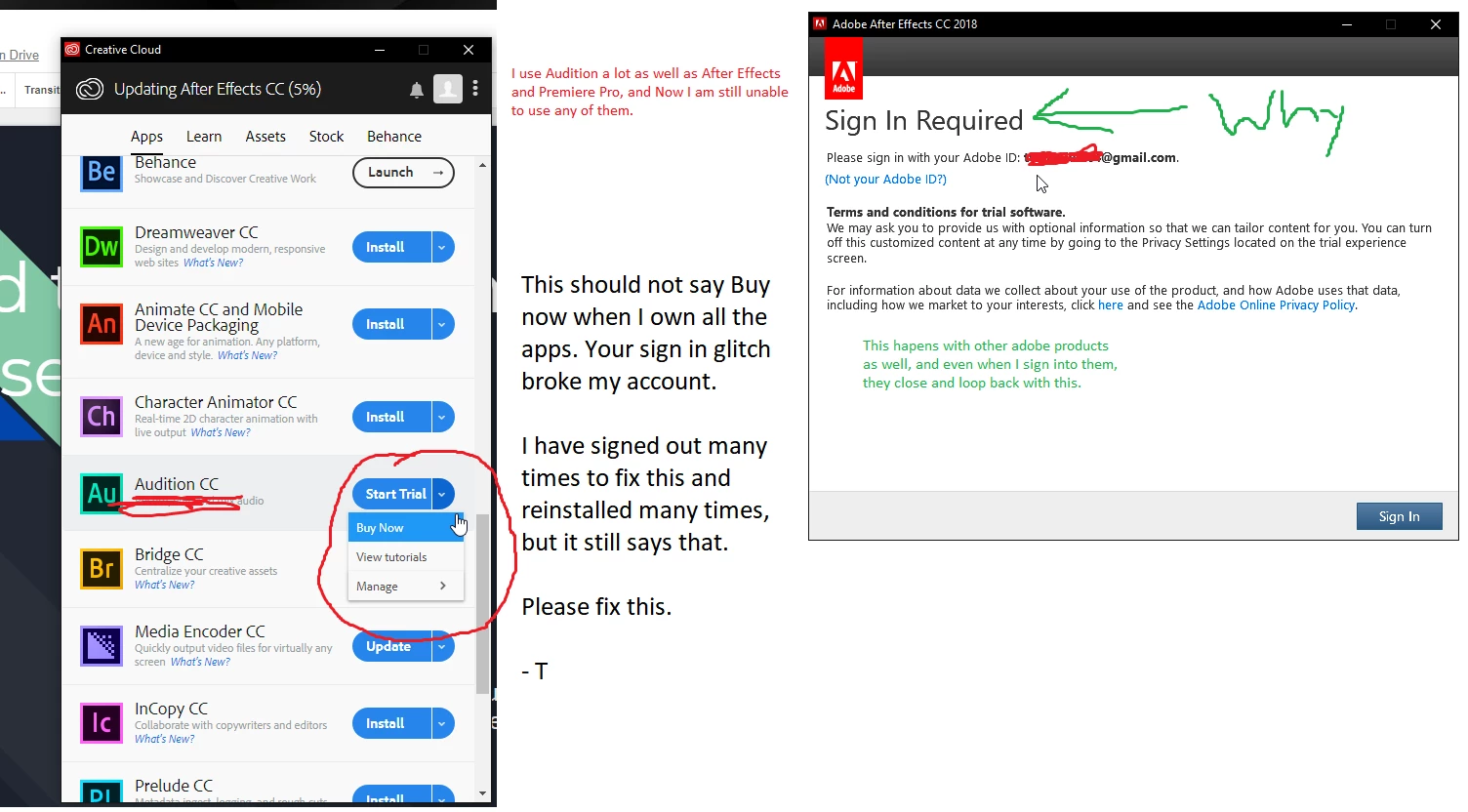
Looping Sign In screen broke my user account (already paid my monthly subscription)

  • October 8, 2018
  • 2 replies
  • 320 views

Hello everyone,

To start off, yes I have uninstalled every app including the Adobe Creative Cloud app, signed out multiple times and still haven't solved this.

I am reaching out to the community for help and will also provide an MS paint screencap of what's going on.

Hope anyone can help ASAP,

- Tyler
This topic has been closed for replies.
Correct answer arij2010

Hi,

Test this :

1 -  For Windows :Run the Tasks Manager to quit these processes .

Quits All Adobe background processes :

Adobe CEF Helper

Adobe Creative Cloud

Adobe IPC Broker

Adobe Genuine Software Integrity Service

CCLibraries

CCXProcess

Creative Cloud

CoreSync

2 - Rename The folders "SlStore" , "SlCache" and "OOBE" to "SlStore.old" , "SlCache.old" and "OOBE.old" in this location :

C:\Users\<user folder>\AppData\Local\Adobe\OOBE

C:\ProgramData\Adobe\SLStore.

C:\Program Files (x86)\Common Files\Adobe\ SlCache

3-

-> Run any application as admin and sign in .

2 replies

arij2010
arij2010Correct answer
Inspiring
October 9, 2018

Hi,

Test this :

1 -  For Windows :Run the Tasks Manager to quit these processes .

Quits All Adobe background processes :

Adobe CEF Helper

Adobe Creative Cloud

Adobe IPC Broker

Adobe Genuine Software Integrity Service

CCLibraries

CCXProcess

Creative Cloud

CoreSync

2 - Rename The folders "SlStore" , "SlCache" and "OOBE" to "SlStore.old" , "SlCache.old" and "OOBE.old" in this location :

C:\Users\<user folder>\AppData\Local\Adobe\OOBE

C:\ProgramData\Adobe\SLStore.

C:\Program Files (x86)\Common Files\Adobe\ SlCache

3-

-> Run any application as admin and sign in .

kglad
Community Expert
Community Expert
October 8, 2018

check your account to verify your subscription is what you expect and to verify your adobe id (used in the next step), https://accounts.adobe.com/

if your account shows

a. your subscription is active,

1.  sign out and then back in to your cc desktop application using the same adobe id above to verify your subscription:  http://helpx.adobe.com/creative-cloud/kb/sign-in-out-creative-cloud-desktop-app.html

2.  if that fails, https://helpx.adobe.com/manage-account/kb/stop-creative-cloud-trial-mode-after-purchase.html

3.  if that fails, https://helpx.adobe.com/creative-cloud/kb/cc-reverts-to-trial.html

4.  if that fails, using a browser that allows popups and cookies,  contact adobe support during pst business hours by clicking here and, when available, click 'chat', http://helpx.adobe.com/x-productkb/global/service-ccm.html

if your account shows

b. you have no subscription and you're paying for one

1. using a browser that allows popups and cookies,  contact adobe support during pst business hours by clicking here and, when available, click 'chat', http://helpx.adobe.com/x-productkb/global/service-ccm.html