
Participant
February 14, 2018
Answered

Lost installation CD and I have an error which say I need to uninstalla and reinstall Adobe CS3 Design Standard

  • February 14, 2018
  • 2 replies
  • 309 views

I lost installation CD of Aobe CS3 Design Standard and Error msg I am getting while opening my Adobe Photoshop is:
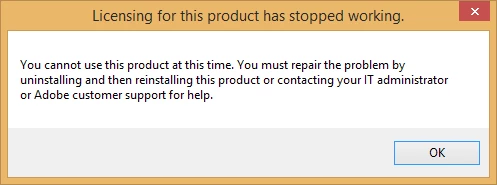
and I have an error which say I need to uninstalla and reinstall Adobe CS3 Design Standard, I have lost the CD, I have downloaded the setup online which leads me to insert disc. Any help ?

    This topic has been closed for replies.
    Correct answer Atul_Saini

    Hi Johnl55283847

    As you are getting the error "Licensing has stopped working, please use the link shared by Kglad to remove it from your machine. Then, to reinstall it, I would request you to download the new setup following the steps mentioned here: - Download Adobe Creative Suite 3 products.

    Please update the discussion in case you need further assistance.

    Thanks,

    Atul_Saini

    2 replies

    Atul_Saini
    Atul_SainiCorrect answer
    Legend
    February 14, 2018

    Hi Johnl55283847

    As you are getting the error "Licensing has stopped working, please use the link shared by Kglad to remove it from your machine. Then, to reinstall it, I would request you to download the new setup following the steps mentioned here: - Download Adobe Creative Suite 3 products.

    Please update the discussion in case you need further assistance.

    Thanks,

    Atul_Saini

    kglad
    Community Expert
    Community Expert
    February 14, 2018

    uninstall (using your control panel) all cs3 programs.

    clean per Use the Creative Cloud Cleaner Tool to solve installation problems

    restart your computer

    retry installing the downloaded cs3.

    [moved from Creative Suites to Downloading, Installing, Setting Up]