joellenarnold
Participant
January 15, 2017
Answered

LR Catalog will not open on external HD with new laptop

  • January 15, 2017
  • 2 replies
  • 648 views

I am attempting to set up a new MacBook Air with CC for travel. I originally had run CC on a MacBook Pro and set up my catalog on an external drive so I could use that drive interchangeably between my MacBook and the travel MacBook Air. Tonight I tried opening the Catalog on the external drive and see this message when I navigate to the catalog:
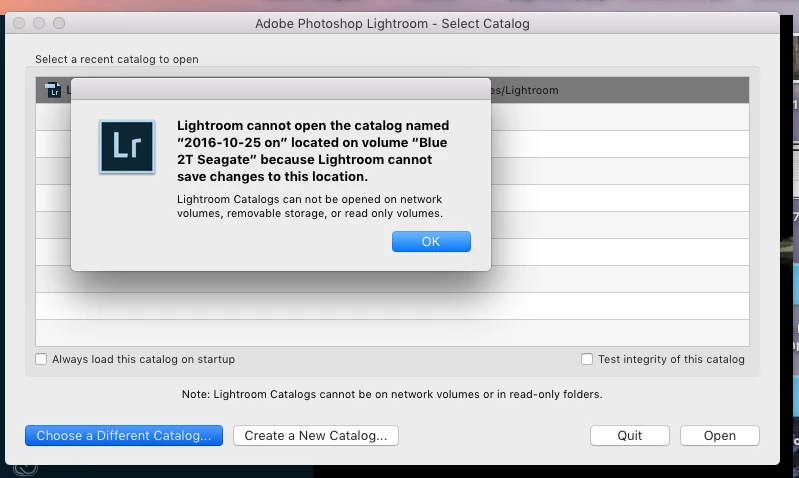
I assume it is because my Sharing & Permissions on the catalog is set to read only. How do I change that setting? Perhaps it can only be done from the original computer I used to create the Catalog. Is that right?

Can some one steer me to a solution?

This topic has been closed for replies.
Correct answer Alfred Pennyworth

This is a Mac problem not LR. Select the folder where the catalog is situated and select Get Info by right-clicking the folder in Finder. Scroll to the bottom and you will see some Read/Write settings for yourself and others. You need to change it to Read and Write. If to says Read/Write already, change it then back again. this is on your new computer by the way!

I would also check to see if the entire disk is also set correctly, as it may cause problems later on. This can be problem with MacOS occasionally, usually just after an update to to OS

2 replies

joellenarnold
Participant
January 16, 2017

Thank you! You are exactly right. I did not have my external hard drive set up properly and had to erase and reformat the disk (after moving the data to another drive, of course). I'd had the drive formatted in Windows NT  instead of Mac OS Extended. All is well! Thank you for your time.

Alfred Pennyworth
Alfred PennyworthCorrect answer
Participating Frequently
January 15, 2017

This is a Mac problem not LR. Select the folder where the catalog is situated and select Get Info by right-clicking the folder in Finder. Scroll to the bottom and you will see some Read/Write settings for yourself and others. You need to change it to Read and Write. If to says Read/Write already, change it then back again. this is on your new computer by the way!

I would also check to see if the entire disk is also set correctly, as it may cause problems later on. This can be problem with MacOS occasionally, usually just after an update to to OS

joellenarnold
Participant
January 16, 2017

Thank you! You are exactly right. I did not have my external hard drive set up properly and had to erase and reformat the disk (after moving the data to another drive, of course). I'd had the drive formatted in Windows NT  instead of Mac OS Extended. All is well! Thank you for your time.