
Known Participant
September 30, 2017
Question

Manage Account Access In Adobe CC

  • September 30, 2017
  • 1 reply
  • 2186 views

Hello

When I open  Adobe Creative Cloud from my desktop shortcut, the below window appears on the screen.

When I click on the faceless avatar(?) at the top right corner, it opens a smaller window with my name, email address and a "manage account" option showing.

When I click on the manage account, nothing happens.

Should I be able to manage my account from here?
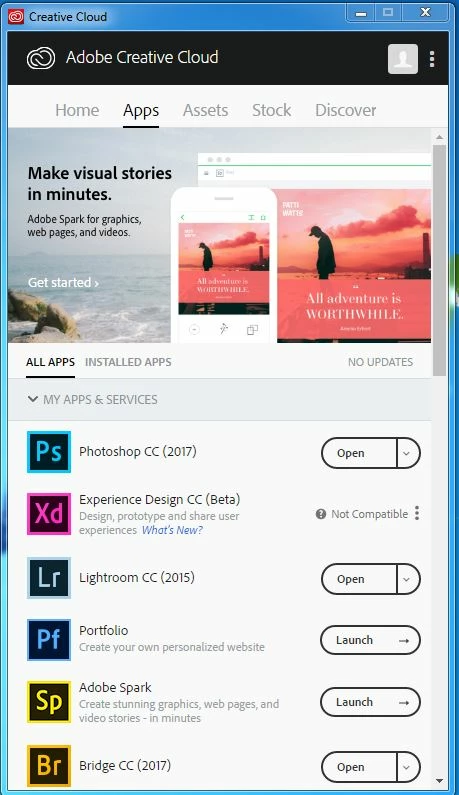
Also, I was going to uninstall a program from my computer and when I went to do that, it shows that I have Adobe Photoshop CC 2017 installed twice in my list of programs.

The programs are basically the same file size and the install dates are about 7 months apart.

I didn't install Photoshop twice and even if I did, why didn't the second install override the first install?

This topic has been closed for replies.

1 reply

kglad
Community Expert
Community Expert
September 30, 2017

it should open a browser window to https://accounts.adobe.com​ but you might have some setting (eg, no default browser selected) that prevents that.  it's no significant issue.

i don't see anything in your ss to suggest there are two ps identical versions installed.

P FlemingAuthor
Known Participant
September 30, 2017

I think you are right about not having a default browser.

I'll assign one and see if that fixes things.

Not sure what you mean by "ss" but this is what shows in my list of programs.

kglad
Community Expert
Community Expert
September 30, 2017

ss = screenshot.

the ss in message 2 shows two different versions (18.0.0 and 18.1.1).  if you don't need both, uninstall the one you don't want.