Participating Frequently
October 21, 2013
Question

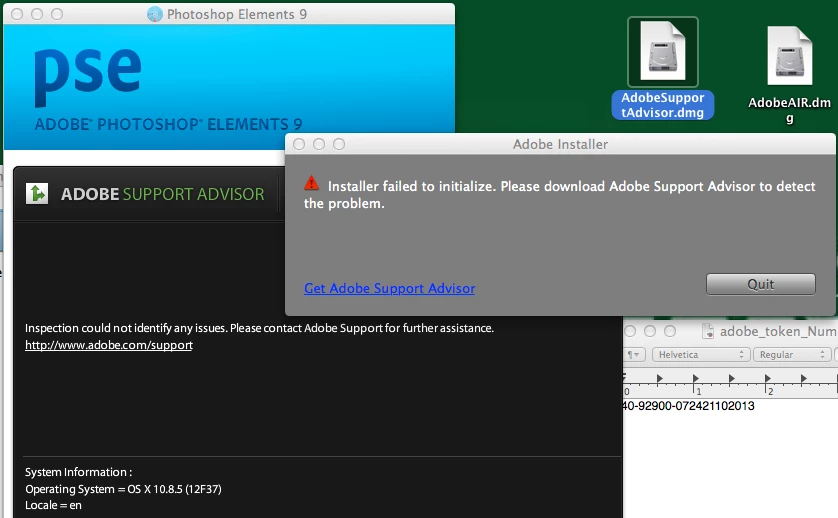
ML 10.8.5 photoshop elements 9, installer failed to initialize.
  • October 21, 2013
  • 2 replies
  • 1095 views

package for support 40-92900-072421102013

cd ~/Desktop/Adobe Photoshop Elements 9/Install.app/Contents/MacOS/

if i try to run the installer from the command line i get

> ./Install

ditto: can't get real path for source

ditto: can't get real path for source

i also tried disabling my anti-virus software, no joy ;(

installed it as root, problem solved.

    This topic has been closed for replies.

    2 replies

    Rave
    Participating Frequently
    October 21, 2013

    Hi OpenDirectoryDude,

    If installing the software via Root user account solves the problem, then the issue might be with the Disk / User permissions.

    Please check if you have proper permissions for the following folder : ~/Library/Application Support/Adobe

    Participating Frequently
    October 22, 2013

    i tried chmod 777 /Library/Application Support/Adobe

    and mkdir ~/Library/Application Support/Adobe

    and chmod 777 ~/Library/Application Support/Adobe

    no joy nothing appears in ~/Library/Application Support/Adobe

    i then tried

    cd /Library/Application Support/Adobe

    chgrp -R 1028 .

    (my group id for all my users is 1028)

    find /Library/Application Support/Adobe -type d -exec chmod 775 {} \;

    still no joy

    still having to install as root

    Participating Frequently
    October 22, 2013

    It's also not fun that i have to do 101 stations one at time.

    Jeffrey_A_Wright
    Legend
    October 21, 2013

    OpenDirectoryDude is this related to the other discussion you started at http://forums.adobe.com/message/5773847#5773847?  In that discussion you were trying to install Photoshop Elements 6.0 and faced difficulties.  You then stated that Photoshop Elements 11 did install successfully.  Is there a reason which you are now also trying to install Photoshop Elements 9?

    To diagnose why Photoshop Elements 9 is failing to install you will want to review the installation log files.  Please see Troubleshoot install using logs | Elements - http://helpx.adobe.com/photoshop-elements/kb/troubleshoot-install-using-logs-elements.html for information on how to locate and interpret your installation log files.  You are welcome to post any specific errors you locate to this discussion.

    Participating Frequently
    October 22, 2013

    yes, i did try to install Photoshop Elements 6.0, it never worked.

    no i never tried to install Photoshop Elements 11.0, sorry for the confusion.

    we are currently installing Photoshop Elements 6.0 using root.

    Participating Frequently
    October 22, 2013

    we did try to install after using

    diskutil repairpermissions /

    that did not help.

    i have l tried a variety of permissions on

    /Library/Application Support/Adobe/

    i will look at the home directory version of this directory but i don't

    understand why that would be relevant.