Participant
July 24, 2018
Answered

move all program files to a different drive

  • July 24, 2018
  • 2 replies
  • 849 views

I downloaded Premiere Pro to my SSD C: and am assuming that all the files that are needed for adobe premiere are on that drive. I want them on my storage HDD 😧 however and i don't know how to get them there.

If anyone knows or is experiencing the same thing please let me know.

Thanks!

This topic is closed to new replies. Start a new post to keep the conversation going.
Correct answer Abambo

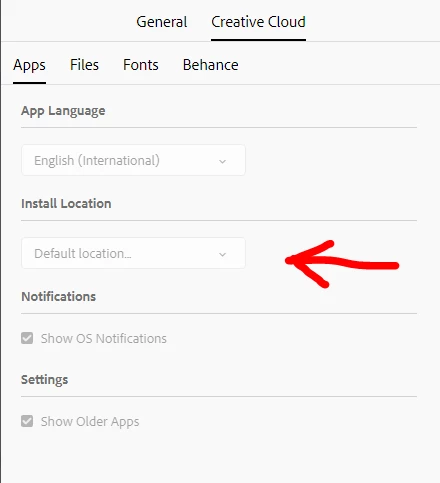
Look here for a different install location:

Try that from your CC app!

2 replies

Participant
January 12, 2021

I have done that now.  How do I move all of my programs to the new location without loosing current settings. If I uninstall and reinstall the program will be where I want it but all of my settings and preferences may be lost.

Abambo
Community Expert
AbamboCommunity ExpertCorrect answer
Community Expert
July 24, 2018

Look here for a different install location:

Try that from your CC app!

ABAMBO | Hard- and Software Engineer | Photographer