
Known Participant
May 17, 2018
Answered

Multiple copies of "adobe_licutil" appearing, slowing down Mac

  • May 17, 2018
  • 6 replies
  • 17682 views

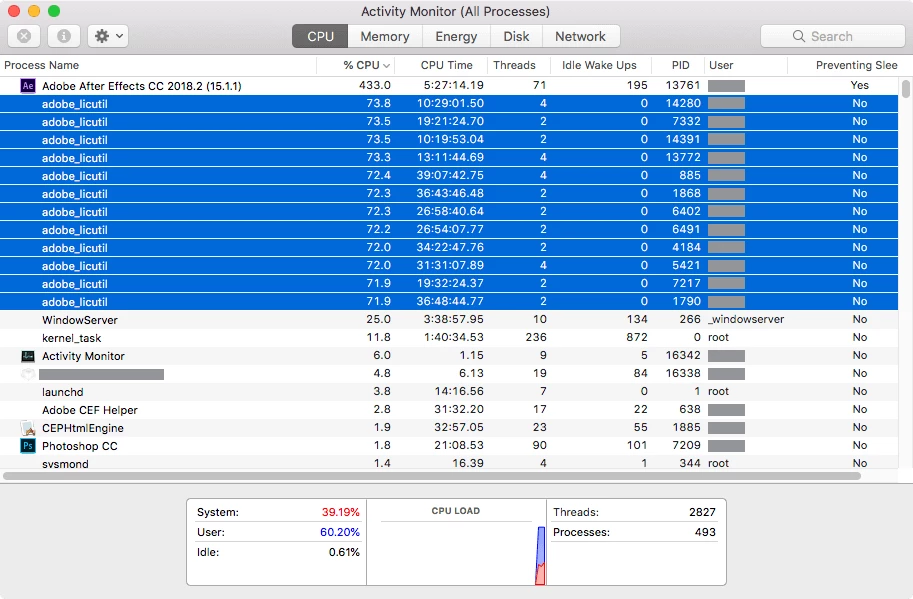
I've been experiencing intermittent slow-downs on my Mac this week. Activity Monitor has shown multiple instances of "adobe_licutil" running (typically four or five degrades performance to a noticeable point, with each process varying from 70-90 CPU utilization). Manually selecting them and force-quitting the process returns the Mac to normal speeds, with no apparent loss in stability.

This morning, AE was rendering particularly slowly. I checked out Activity Monitor and found a dozen "adobe_licutil" processes plugging away! After manually selecting and force-quitting each "adobe_licutil" process, performance of the Mac again returned to normal.

Any ideas what what's causing this process to spawn repeatedly and what it's doing that would justify the CPU usage?
Correct answer igor.dovale

Hello, everybody.

I was having the same problem with my Creative Cloud. I tried to reinstall all the CC stuff without success. I called Adobe by phone and they said me to send my System Report Log and CC Logs (using Adobe Log Collector Tool) by email. After all, I discovered by myself how to fix this problem:

On Mac OS X:

1. Stop all adobe_licutil processes.
2. Quit all Adobe apps.
3. Go to Applications/Utilities/Adobe Application Manager/P7

4. Rename "adobe_licutil" as "adobe_licutil_old". Type your password.
5. Go to Applications/Utilities/Adobe Application Manager/P6
6. Copy "adobe_licutil" and paste on Applications/Utilities/Adobe Application Manager/P7. Type your password.
7. Open any Adobe App and check if the problem is solved.

I hope it works as it worked for me and that it helps you all.

6 replies

igor.dovaleCorrect answer
Participant
July 19, 2018

Hello, everybody.

I was having the same problem with my Creative Cloud. I tried to reinstall all the CC stuff without success. I called Adobe by phone and they said me to send my System Report Log and CC Logs (using Adobe Log Collector Tool) by email. After all, I discovered by myself how to fix this problem:

On Mac OS X:

1. Stop all adobe_licutil processes.
2. Quit all Adobe apps.
3. Go to Applications/Utilities/Adobe Application Manager/P7

4. Rename "adobe_licutil" as "adobe_licutil_old". Type your password.
5. Go to Applications/Utilities/Adobe Application Manager/P6
6. Copy "adobe_licutil" and paste on Applications/Utilities/Adobe Application Manager/P7. Type your password.
7. Open any Adobe App and check if the problem is solved.

I hope it works as it worked for me and that it helps you all.

Participant
July 19, 2018

That's worked for me - thanks very much - this has been driving me mad!!

Great work - thanks again!

Participant
June 16, 2018

I've had exactly the same problem for over a month now. I went on Adobe support who then remotely controlled my desktop and made some changes. After about 30 mins they told me it was a problem with the OS and I should contact Apple!

Somehow I don't think Apple would listen to me about a problem with adobe_lucuti slowing down the OS and it being Apple's problem!!

The only way I can stop this is to constantly Force Quit each adobe_licuti after each time I start an Adobe App, otherwise my fan is running constantly :-/

MoovIT Jan
Participating Frequently
June 20, 2018

So did you finally solve that? I am havin that problem right now and it drives me nuts!!

Participant
June 20, 2018

Nope. I just keep activity monitor open and force-close down each adobe_licuti each time I start an app. Driving me mad too!!

Participating Frequently
June 7, 2018

I have exact same issue. Have reinstalled the Creative Cloud app multiple times; tried replacing the contents of various libraries per instructions here High CPU usage due to CEPHtmlEngine​ and have made sure that various permissions have been updated to various adobe library folders and their contents as per suggestions on another thread. None of this has worked. Having to manually kill occurrences of adobe_licutil.

This is not a "solution".  Mysteriously, overnight, adobe_licutil will often start up again and I will wake up to a laptop that has been using max cpu power overnight and is hot to the touch.

This seems to have been a long-standing problem and it's about time that Adobe got it sorted.

kirrieman
Participant
June 3, 2018

Same here. adobe_licutil consumes 100% CPU as soon as I start Lightroom Classic. I have also seen multiple instances of it pop up but have been unable to correlate that with anything I am doing. I *think* but would not swear to it that this started after the updated to 7.3.1.

As others have stated, the ONLY way to recover is to manually kill the process.

------

quad i7 imac, 12G RAM, OS 10.13.4

bigshahan
Participant
May 24, 2018

I'm getting the same exact issue. Completely uninstalling and re-installing creative suite has not helped.

arij2010
Inspiring
May 18, 2018

Hi T1 Sn,

1 - Quits All Adobe background processes from the activity monitor  :

Adobe CEF Helper

Adobe Creative Cloud

Adobe IPC Broker

Adobe Genuine Software Integrity Service

CCLibraries

CCXProcess

Creative Cloud

CoreSync

2 - Rename The folders "SlStore" , "SlCache" and "OOBE" to "SlStore.old" , "SlCache.old" and "OOBE.old" in this location :

- For MAC :

MAC HD/Users/<user folder>/Library/Application Support/Adobe/OOBE

MAC HD/Library/Application Support/Adobe/SlStore

MAC HD/Library/Application Support/Adobe/SlCache

-> Test

Regards,

Known Participant
May 20, 2018

I followed your advice, and the result was to render all installed CC apps useless. Launching any app now resulted in a dialog box with a "Configuration Error" -- Error:16. The CC app listed several apps as being "zero day trials" with an button to buy. On the plus side, no instances of "adobe_licutil".

A uninstall and reinstall of the Creative Cloud app didn't change anything. Launching an installer to reinstall Photoshop just checked with the CC app and quit out.

I went back into the directories you specified, expecting to see new folders/files created alongside the ".old" versions, but there weren't any. I removed the ".old" and restarted. On reboot, I could open the apps once again. I fired up Photoshop and checked the activity monitor. Two incidences of "adobe_licutil" were in my processes list.

Looking forward to hearing what any next steps might be. In the meantime, I'll continue to check out Activity Monitor now and then.

arij2010
Inspiring
May 21, 2018

Hi,

This is a permissions error .Give both Adobe folders read and write permissions in these locations :

MAC HD/Users/<user folder>/Library/Application Support/Adobe

MAC HD/Library/Application Support/Adobe

Don't forget to apply to enclosed items :

Image result for apply to included items mac os permissions