My CC apps don't work. Uninstall apps missing. CC Desktop is blank.
All my CC apps were working fine until after the latest PS CC upgrade. PS wouldn't open and I got an error.
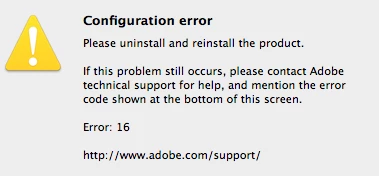
I followed instructions found in a forum (but can't remember what I did), and that must have really messed things up because then nothing would work. I got that dialog on everything.
I followed more instructions (found in a search) and downloaded Adobe Creative Cloud Cleane. I think I followed the wrong instructions and cleaned things that should not have been cleaned. Now my CC Desktop is blank and all my Uninstall apps are missing. Clicking on the stortcuts brings up a dialog: "The alias “Uninstall Adobe Photoshop CC” can’t be opened because the original item can’t be found."
Is there a way to start all over again? I'm in a real bind because I have two projects!
I'm an idiot.
PLEASE HELLLLLLP!!!!!!!!!!!!
 AdChoices