



Grupo TLF Jeans
Participant
September 26, 2022
Answered

Não foi possivel sincronizar.

  • September 26, 2022
  • 1 reply
  • 344 views

Olá, instalei um SSD novo na minha máquina e quando fui instalar o app de desktop da CC houve um erro que não encontro solução. Já tentei reinstalar, limpar todos os arquivos com o Cleaner e mesmo assim o mesmo erro ocorre. Estou impossibilitado de trabalhar pois não tenho como instalar os softwares. 

Print da mensagem de erro:
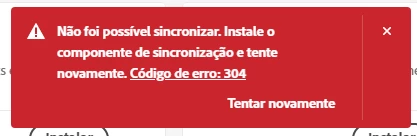
 

A rough translation would be: "Unable to syncronize. Install the syncronization component and try again. Error code: 304"

This topic has been closed for replies.
Correct answer kglad

for everyone seeing error 304: you need the correct installer. the automated download page may not be accurately detecting your os version so you should hand select the correct installer. before doing that, prep your computer by cleaning the adobe files already installed by the incorrect installer.


here are the steps again,


if it's installed, uninstall the cc desktop app, using the correct uninstaller, https://helpx.adobe.com/creative-cloud/help/uninstall-creative-cloud-desktop-app.html#sa_src=web-mes...


clean your computer of cc files per http://www.adobe.com/support/contact/cscleanertool.html


check for, and if available, update your os


restart your computer (don't skip this)


reinstall the cc desktop app, using the correct (for your os) link at the bottom of the page at https://helpx.adobe.com/download-install/kb/creative-cloud-desktop-app-download.html


use the desktop app to install your cc programs/trials

1 reply

kglad
Community Expert
kgladCommunity ExpertCorrect answer
Community Expert
September 26, 2022

for everyone seeing error 304: you need the correct installer. the automated download page may not be accurately detecting your os version so you should hand select the correct installer. before doing that, prep your computer by cleaning the adobe files already installed by the incorrect installer.


here are the steps again,


if it's installed, uninstall the cc desktop app, using the correct uninstaller, https://helpx.adobe.com/creative-cloud/help/uninstall-creative-cloud-desktop-app.html#sa_src=web-mes...


clean your computer of cc files per http://www.adobe.com/support/contact/cscleanertool.html


check for, and if available, update your os


restart your computer (don't skip this)


reinstall the cc desktop app, using the correct (for your os) link at the bottom of the page at https://helpx.adobe.com/download-install/kb/creative-cloud-desktop-app-download.html


use the desktop app to install your cc programs/trials

Grupo TLF Jeans
Participant
September 27, 2022

Thank you very much, turns out the only thing that I haven't done was updating the OS and that was the very thing that made it work. 

kglad
Community Expert
Community Expert
September 27, 2022

good to hear!  (and thank you for that info!)