Participant
February 16, 2021
Answered

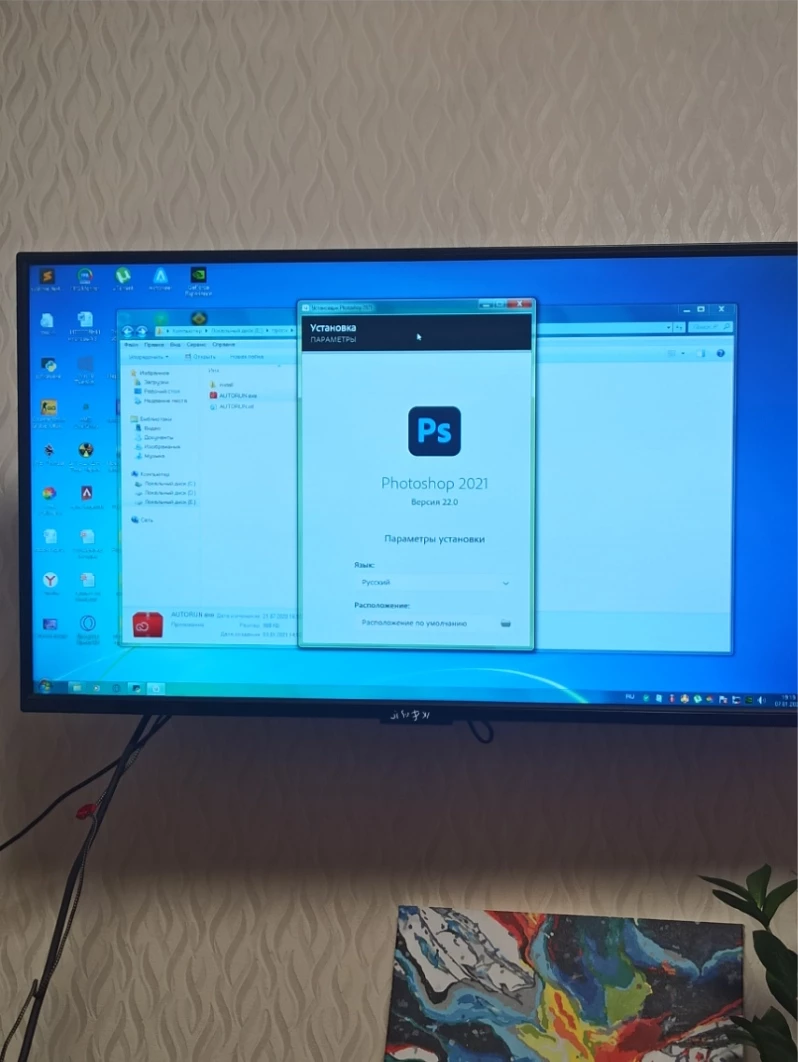
Нет кнопки продолжить в установщике фотошопа

  • February 16, 2021
  • 3 replies
  • 1876 views

This topic has been closed for replies.
Correct answer Кирилл25455977lglb

Нужно нажать Tab и окно прокрутиться и будет кнопка продолжить. Лично у меня сработало


3 replies

AxelMatt
Community Expert
Community Expert
February 16, 2021

As far as I see on your screenshot you are working with Windows 7.

Photoshop CC 2021 doesn't support Windows 7. You can't install this version of PhotoShop on your machine.


There are two alternatives: Either you update your Windows to version 10 (build 1809 or newer) or you install Photoshop CC 2020.


I recommend the update to Windows 10, because Windows 7 is a security risk.


My System: Intel i7-8700K - 64GB RAM - NVidia Geforce RTX 3060 - Windows 11 Pro 25H2 -- LR-Classic 15 - Photoshop 27 - Nik Collection 8 - PureRAW 5 - Topaz Photo
Participant
July 24, 2022

Good afternoon, I have windows 10, but I still experience the same problems with the installation, if you have encountered a similar problem, please help me. I've reinstalled photoshop a few times but it didn't work.

Peru Bob
Community Expert
Community Expert
July 24, 2022

What are the complete computer specs, including hard drives (how many, what kind, what is on each, what capacity, and how full)?

Akash Sharma
Legend
February 16, 2021

Moved to Download and Install community

italosan
Community Expert
Community Expert
February 16, 2021

Hi, could you give us more information?