


Participating Frequently
November 22, 2021
Question

New MAC Book pro wont open my Lightroom version 6

  • November 22, 2021
  • 5 replies
  • 1845 views

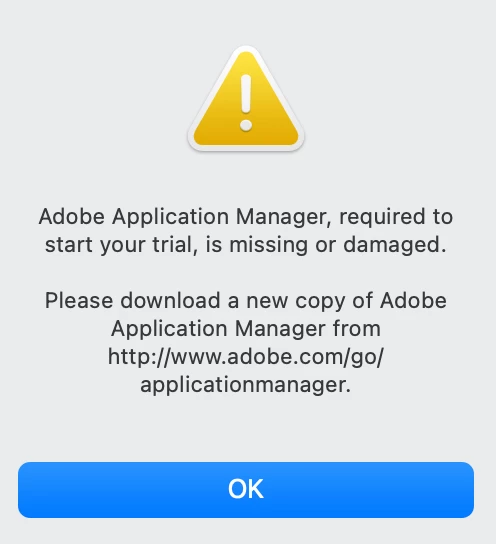
Hi just bought the lastest Mac book pro and went through the transfer process no problem from my old Mac. Including Lighjtroom 6 that I purchased a few years back. Initially it opened it fine but now it trys to open it but goes to a pop up saying Adobe appication manager required and a link to an adobe page that no longer exists. (Screen Shot attached). I then went onto my Adobe accout and confirmed my purchase is there but that wont let me download it as it says "This installer is no longer available" (Screen Shot attached) I bought this as I dont use it that much and dont want to pay a monthly fee. Any help greatfully accepted!
shot attached.
 

<screenshot showing serial number removed>

This topic has been closed for replies.

5 replies

Participant
December 1, 2021

LR 6 is obsolete programming. I don't figure you can run it significantly less introduce it on Catalina, Big Sur or Monterey.

Which OS do you have on your new MacBook?

A Creative Cloud Photography Plan (approx $10/month for a considerable length of time). Remembers the accompanying and works for present day PCs:

- Photoshop CC and Photoshop on iPad

- Lightroom on work area, portable and the web

- Lightroom Classic

- Portfolio site + facilitating

- Spark with premium elements

- Bridge

- 20 GB distributed storage (upgradable to 1 TB).

https://www.adobe.com/creativecloud/photography.html

Assuming you move up to Creative Cloud, first ensure your PC meets the base CPU and GPU prerequisites. Most Creative Cloud applications work on:

macOS 12 (Monterey), macOS 11 (Big Sur), macOS 10.16 or 10.15 (Catalina)

- https://helpx.adobe.com/creative-cloud/system-requirements.html
- https://helpx.adobe.com/photoshop/system-requirements.html
- https://helpx.adobe.com/photoshop/kb/photoshop-cc-gpu-card-faq.html

Trust that makes a difference. 😇

Participating Frequently
November 30, 2021

Thanks to everyone who has tried to help with a solution, but due to Adobe not updating their installer to enable Lightroom 6 to be installed on the new 64bit Mac I have bought (Lightroom 6 itself runs fine on the 64 bit platform) I have had to give up. I am now Looking at alternative solutions out there that I can purchase and not pay a monthly subscription to. The Mac shop have been very supportive and tried various sol;ution but the migration tool installs my old version of LR 6 but it wont run without an updated Adobe application manager. Very frustrating!


Thanks again to you all for your help and advice.

LinSims
Community Expert
Community Expert
November 30, 2021

The installer and LR6 are BOTH 32-bit programs, and the newer Apple OSs will not run anything other than 64-bit programs. Even if the installer ran, the program won't.

Nancy OShea
Community Expert
Community Expert
November 22, 2021

LR 6 is outdated software.  I don't think you can run it much less install it on Catalina, Big Sur or Monterey.

Which OS do you have on your new MacBook?


A Creative Cloud Photography Plan (approx $10/month for 12 months). Includes the following and works on modern computers:
- Photoshop CC and Photoshop on iPad
- Lightroom on desktop, mobile and the web
- Lightroom Classic
- Portfolio website + hosting
- Spark with premium features
- Bridge
- 20 GB cloud storage (upgradable to 1 TB).
https://www.adobe.com/creativecloud/photography.html

If you upgrade to Creative Cloud, first make sure your computer meets the minimum CPU & GPU requirements. Most Creative Cloud apps work on:
macOS 12 (Monterey), macOS 11 (Big Sur), macOS 10.16 or 10.15 (Catalina)
- https://helpx.adobe.com/creative-cloud/system-requirements.html
- https://helpx.adobe.com/photoshop/system-requirements.html
- https://helpx.adobe.com/photoshop/kb/photoshop-cc-gpu-card-faq.html

Hope that helps. 😇


Nancy O'Shea— Product User & Community Expert
Participating Frequently
November 23, 2021

Hi Nancy I am an amaueur photographer and dont use this software every day maybye only once a month. So Lightroom 6 might be outdated to you but it works fine for me and does everything I want it to. I think its very mercinary of Adobe to stop me loading software I bought and own on to a new machine that is compatable and trying to force me to pay a subscription for software that gives me no benifit for as long as I own the machine Thats £10 a month £120 a year.


Participating Frequently
November 23, 2021

For your information its a Mac Book pro, brand new running Monterey.

Pete

Govardhan.V
Participating Frequently
November 22, 2021

Also let us know wherher you had installed Lightroom app as a Fresh installation ?

or Did you migrated using tool like migration assistant?

Participating Frequently
November 22, 2021

Hi again I used the migration tool as that is what I was told to do by the Mac Shop and as I say when I opened on the first occasion it worked. But since then it wont open? I have found my oroiginal purchase on the Adobe website in my account. But the download link doesnt work (to be fair it says its no longer available) I have attached a screen shot of it above. I am obviously reluctant to delete it as I cant download it again. I have been back to the MAC shop today and vented my frustration to them as they clearly told me it would all work as long as it runs on 64bit (which this does) But they now have quite a few thousand pounds of my money now.

Participating Frequently
November 22, 2021

Govardhan.V
Participating Frequently
November 22, 2021

Download and install Adobe Creative Cloud desktop app and then try .


https://www.adobe.com/in/creativecloud/desktop-app.html

Participating Frequently
November 22, 2021

Hi Brucgovn

Thanks for your prompt reply. I tried downloading Creative cloud app and the problem persists. The Adobe Downloads Manager doesnt seem to exist anymore and as I say the link that pops up when I try and open it doesnt work either.