Participant
October 7, 2024
Answered

No Download No Serial Number for Purchase

  • October 7, 2024
  • 1 reply
  • 247 views

I purchased the upgrade for Adobe Photoshop Elements/Premier Elements 2025 over the weekend. The downloads are not showing up in my account nor are the serial numbers. They did not arrive via email, either. I have an email that said I paid, so where are my software and serial numbers???

This topic has been closed for replies.
Correct answer John T Smith

Did you purchase from Adobe, or a different vendor?


If from Adobe, you need to contact support

This space is provided by Adobe, but this is not Adobe support
This is a public forum, you need the link to Adobe support, not other users
Help Center https://helpx.adobe.com/support.html is a good place to start
Be sure to remain signed in with your Adobe ID before accessing the link below
Do be aware that wait times are sometimes long before an agent responds
.
You MUST make sure that your browser does NOT block ads, scripts, or pop-ups
You MUST also allow 'cookies' in your web browser for the link to work
This will NOT work if you are using a VPN
.
This link will go directly to the chat option
https://helpx.adobe.com/contact.html?rghtup=autoOpen
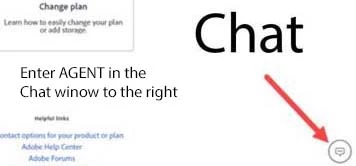
Type "Agent" in the chat box to bypass the chatbot and be connected to a person
-Meaning type in the word Agent in the lower right, without the quote " " marks
or
X (aka Twitter) tweet @AdobeCare
.
Adobe does NOT do support by email, so beware of answering anyone who sends you a private message
-click for more information about scammers https://tinyurl.com/10791730

 

1 reply

John T Smith
Community Expert
John T SmithCommunity ExpertCorrect answer
Community Expert
October 7, 2024

Did you purchase from Adobe, or a different vendor?


If from Adobe, you need to contact support

This space is provided by Adobe, but this is not Adobe support
This is a public forum, you need the link to Adobe support, not other users
Help Center https://helpx.adobe.com/support.html is a good place to start
Be sure to remain signed in with your Adobe ID before accessing the link below
Do be aware that wait times are sometimes long before an agent responds
.
You MUST make sure that your browser does NOT block ads, scripts, or pop-ups
You MUST also allow 'cookies' in your web browser for the link to work
This will NOT work if you are using a VPN
.
This link will go directly to the chat option
https://helpx.adobe.com/contact.html?rghtup=autoOpen
Type "Agent" in the chat box to bypass the chatbot and be connected to a person
-Meaning type in the word Agent in the lower right, without the quote " " marks
or
X (aka Twitter) tweet @AdobeCare
.
Adobe does NOT do support by email, so beware of answering anyone who sends you a private message
-click for more information about scammers https://tinyurl.com/10791730

 

JanaB12Author
Participant
October 8, 2024

Thank you so much. I did purchase directly from Adobe, so I'll go through Tech Support.

Appreciate your help.

kglad
Community Expert
Community Expert
October 8, 2024

let us know the outcome.

