

Participant
June 24, 2021
Question

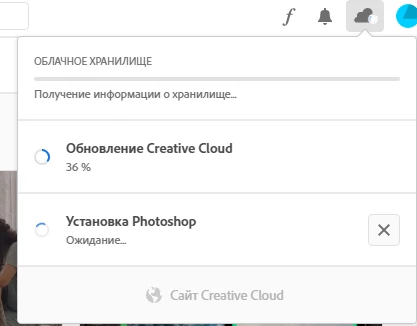
Not working

  • June 24, 2021
  • 1 reply
  • 211 views

It's staying on this step 30+ minutes. 


Not installing


How install programs? 

This topic has been closed for replies.

1 reply

Peru Bob
Community Expert
Community Expert
June 24, 2021

See here:
https://helpx.adobe.com/creative-cloud/kb/creative-cloud-desktop-app-installation-stuck.html
https://helpx.adobe.com/creative-cloud/kb/stop-responding-downloading-apps.html
https://helpx.adobe.com/creative-cloud/kb/troubleshoot-install-logs-cc.html
https://community.adobe.com/t5/get-started/updating-adobe-creative-cloud-stuck-at-39/m-p/10916241?page=1
https://helpx.adobe.com/creative-cloud/kb/creative-cloud-app-doesnt-open.html
I had a similar issue.

Make sure that you have all Windows updates that are available.

The one thing that was causing it for me, believe it or not, was that I needed to do a clean installation of the latest Studio graphics driver from the NVIDIA website. After doing that and restarting, all was OK.