


Participant
April 4, 2021
Question

Old inaccessible app versions still showing on CC dashboard

  • April 4, 2021
  • 1 reply
  • 604 views

Hi!
Wondering if anyone else has encountered this bug. All my apps are up to date, and as far as I know I've succesfully uninstalled/removed all older versions but they still show on the Creative Cloud dashboard /In my case After Effects and Acrobat X). I can't open the old apps or uninstall from the dropdown menu, and I can't seem to find them anywhere else on my computer.

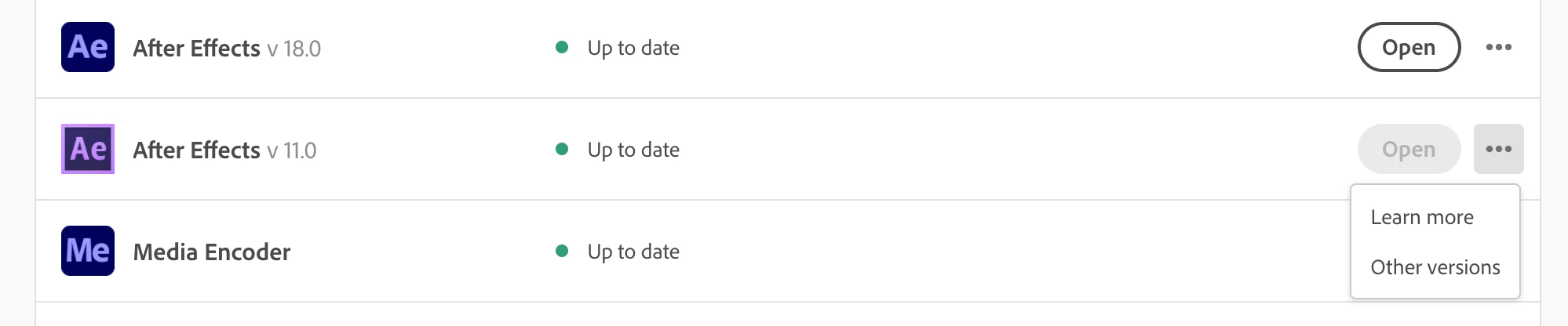
 

Anyone know how to get rid of these? Just don't want any old versions cluttering up my computer.

This topic has been closed for replies.

1 reply

Nancy OShea
Community Expert
Community Expert
April 4, 2021

Use the Adobe Cleaner tool to wipe all traces of unwanted Adobe apps from your system including old versions of Acrobat, Flash Player, Shockwave, etc...  and then update your Creative Cloud desktop app.

https://helpx.adobe.com/creative-cloud/kb/cc-cleaner-tool-installation-problems.html


1. Open CC Desktop App.
2. Click your Avatar (top right image) > Preferences > General tab > Settings. Select "Always keep Creative Cloud up to date."
3. Click on your Avatar again.
4. Sign-out of Creative Cloud.
5. Close all apps.
6. Restart your computer.
7. Open CC Desktop app.
8. Click your Avatar.
9. Sign-in with your paid ID and password.


Hope that helps.


()__()
(='.'=)
(")_(")


Nancy O'Shea— Product User & Community Expert
smnrenAuthor
Participant
April 5, 2021

Thanks for the tip, that sounds just like what I need. However I'm running into some problems following the "Important first steps" before using the Cleaning Tool: I don't see a CoreSync folder in ~/Library/Application Support/Adobe/CoreSync/ and I'm not able to terminate CoreSync from the Activity Monitor, it just starts back up again instantly.

Are these precaution steps vital or can I use the cleaning tool anyway? Thanks.

Legend
April 5, 2021

Precautions are vital. What do you see in the CoreSync folder? Or is it that you can't find ~/Library/Application Support/Adobe/CoreSync