woodburnfour
Participant
June 4, 2016
Answered

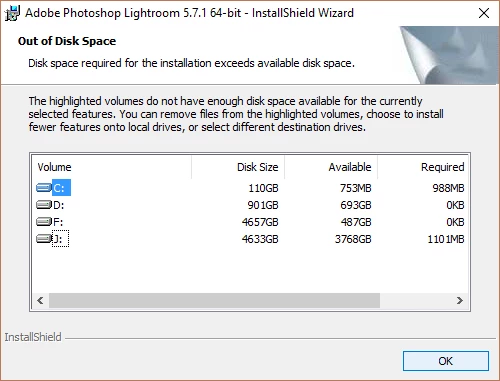
Out of Disk Space

  • June 4, 2016
  • 3 replies
  • 894 views

I have a new windows 10 PC and am trying to reinstall Lightroom 5.  This machine has a small SSD primary drive without much space.  I have other drives with a ton of room, but can't seem to get it to install without requiring a 900 MB on the primary windows drive.  Does anyone have any suggestions?

    This topic has been closed for replies.
    Correct answer Govardhan.V

    Also you may try deleting System and user Temp folders.

    User Temp :

    Press Windows button (located between Ctrl and Alt buttons) along with R button together at a time , you will get a run command window.

    Type in below command and hit 'Enter' key.

    %temp%

    It will open  User Temp folder.delete all files n folders present inside.

    System Temp:

    Press Windows button (located between Ctrl and Alt buttons) along with R button together at a time , you will get a run command window.

    Type in below command and hit 'Enter' key.

    Temp

    It will open System Temp folder. delete all files n folders present inside.

    Prefetch :

    Press Windows button (located between Ctrl and Alt buttons) along with R button together at a time , you will get a run command window.

    Type in below command and hit 'Enter' key.

    Prefetch

    It will open Prefetch folder. delete all contents inside.

    3 replies

    Govardhan.V
    Govardhan.VCorrect answer
    Participating Frequently
    June 5, 2016

    Also you may try deleting System and user Temp folders.

    User Temp :

    Press Windows button (located between Ctrl and Alt buttons) along with R button together at a time , you will get a run command window.

    Type in below command and hit 'Enter' key.

    %temp%

    It will open  User Temp folder.delete all files n folders present inside.

    System Temp:

    Press Windows button (located between Ctrl and Alt buttons) along with R button together at a time , you will get a run command window.

    Type in below command and hit 'Enter' key.

    Temp

    It will open System Temp folder. delete all files n folders present inside.

    Prefetch :

    Press Windows button (located between Ctrl and Alt buttons) along with R button together at a time , you will get a run command window.

    Type in below command and hit 'Enter' key.

    Prefetch

    It will open Prefetch folder. delete all contents inside.
    woodburnfour
    Participant
    June 5, 2016

    This worked well, and Lightroom is installed without killing the smaller primary drive!  Thanks for the help!!!

    Govardhan.V
    Participating Frequently
    June 6, 2016

    Glad to hear that

    You are most welcome.

    Mylenium
    Legend
    June 5, 2016

    Forget it. This won't work. Your system is already suffocating. There are specific requirements in the Windows Installer that extend beyond the actual LR setup. Bending the temp folders and moving the user home directories might mitigate some of your issues, but the truth probably is that you need a bigger disk. Even if you get LR installed now, you will always run into trouble using it when it goes looking for its catalog or temp files... Read the part on SSDs in this article:

    http://myleniumerrors.com/installation-preparations/

    Mylenium

    Rajashree Bhattacharya
    Legend
    June 5, 2016