

Participant
January 16, 2014
Answered

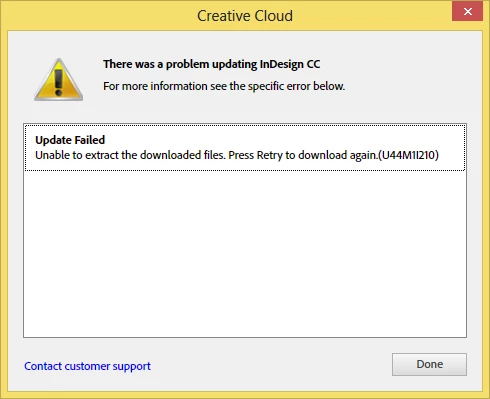
Photoshop CC update failed (U44M1|210)

  • January 16, 2014
  • 17 replies
  • 24891 views

I keep retrying but it keeps failing. Says it cannot extract the file.

What can I do to fix that?

This topic has been closed for replies.
Correct answer Romsinha-9KMEUt

I'm getting the same error (for Photoshop, InDesign, and Illustrator) but turning off my virus protection did not help.
Danielle


Hi DaniLew,

Please enable hidden admin account and try updating from there.

Link: http://www.ghacks.net/2012/06/11/windows-8-enable-the-hidden-administrator-account/.

Regards,

Romit Sinha

17 replies

Participant
February 18, 2016

I too have been unable to update Photoshop CC after many tries, receiving error U44M1P34.  My operating system is Windows 7 Professional.

I have tried almost everything suggested in this forum, including enabling the hidden admin account, creating a new user account with administrator privileges, deleting the \Adobe\AAMUpdater\1.0\ folder, etc.  Nothing has worked.  Last night I must have spent an hour on chat with an Adobe customer support person, during which he took control of my computer and tried various things, the only tangible result of which was that, after that, I could no longer even open the Adobe Creative Cloud Desktop App (I had to reinstall the app this morning, but it now opens only irregularly -- sometimes it hangs or does nothing).  This morning I again chatted with an Adobe customer support person, who wanted to start the whole procedure over again – taking control of my computer, etc.  I refused, since I can’t waste any more time on this.  This is just unacceptable.  I am now considering simply cancelling my subscription to Photoshop CC and relying instead on Photoshop Elements, which I also have.  I am very disappointed in Adobe.

Participant
February 20, 2016

Today, after not being able to update Photoshop CC for two days, I decided to completely uninstall Photoshop and related programs, including Adobe Bridge, and then reinstall everything.  However, after uninstalling, I found I could not reinstall -- despite repeated attempts, the Adobe Creative Cloud desktop app kept hanging during the reinstallation of Photoshop CC.  I finally began a chat session with an Adobe customer support person, who, over a two-hour period, did a clean install.  I now have a current version of Photoshop CC, and I commend Adobe customer support.  But I do wish that Photoshop CC updates involved less hassle.

Participating Frequently
December 14, 2015

Just wanted to post my workaround as it's not stated here. FYI, I'm on the latest version of OS X Yosemite 10.10.5. I had to manually install PS 15.0.1 previously (using a link I found from Adobe that I Googled). However, PS15.1 just came out a couple weeks ago, which includes Device Preview Panel (which connects to the Preview CC app on your phone). I was getting an error message that the update failed, same as everyone else. I even tried Darron's workaround by going to Disk Utility and copying over the DMG files and launching them. That didn't work either, same error message was appearing.

Here's what I did:
- Went to Adobe.com to the Photoshop page, went to download trial, which, for some reason is an older copy 15.0 (You'll get three dropdowns which asks if you're a beginner, what you're using it for etc). If that doesn't work then just search for 15.0 somewhere.
- It launches Creative Cloud from your menu icon up top. Then asks if you want to replace (it's replacing 15.0.1 with an older version 15.0). I click yes to replace.
- Once that's complete, I open PS to confirm it's 15.0. Then I go to Help > Update (or something like that). This launches CC again with the update appearing under PS (which also updates a few other apps, Flash CC and AE). Then click update.
- Finally, after doing that, it updates to the latest version of PS.

Pedro Hassan
Participating Frequently
September 27, 2015

Just reinstalled my CC apps, got stuck on the Photoshop update. Can someone help? (Admin user workaround did not work)

Edit: I renamed my AppData\Local\Adobe\AAMUpdater folder from 1.0 to 1.0.old - ran the update, it failed - renamed it back to 1.0 (deleted the one that was created) and BOOM. It worked.

Hope this is the last time I have to go trough something like these.

Bootsuk
Known Participant
August 7, 2015

Using a Mac.

Create a fresh user account with admin privileges and update from there. (I just called mine update)

Thats the official Adobe fix.

I believe its the same for a PC but not had any trouble with my Pc's. (yet)

Worked for me.

Participant
August 8, 2015

I have a brand new Windows 10 laptop and I have tried enabling the admin account and running the update from there, and running the CC Desktop as Admin, and renaming the Camera Raw update folder as suggested; none make the slightest difference. Come on Adobe- this is beyond a joke.

Bootsuk
Known Participant
August 9, 2015

I'm using Win 7 Ultimate 64 bit so no idea re Win 10.

Did you actually create a new account or use an existing one?   Maybe create is the important bit, just a guess.

I agree, Adobe should be doing more to rectify the situation and answer this discussion.

Participant
July 30, 2015

This happens on my Mac every time there's an update. This needs to be fixed. Time to crawl back to Aperture???

Participant
June 23, 2015

I tried all the Windows suggestions here, but Photoshop CC still won't update.  Instead, I get an error U43M1D204.  I'm going to search that error now.

Participant
June 19, 2015

I closed Adobe creative cloud then ran as admin then it worked.

Start/all programs/right-click Adobe Creative Cloud and run as administrator. Then ran update and it went through.

Windows 7

Participant
June 19, 2015

You can also set it to run as admin...

Participant
March 24, 2015

Great comments from darron en lai (see 01.28.2015 post).  Reveal in Finder to discover that Adobe installer packages reside in the User/Library/Application Support/Adobe/AAMUpdater directory.  Close any active CC or AAM sessions and then run the Setup installer packages.  For me, the latest Camera RAW updates hung up CC Desktop installations on multiple apps - frustrating, but this appears to work and everything is back on track now.

Thanks to everyone for suggestions.

progan
Participating Frequently
May 16, 2015

THANK YOU Little Johan for actually guiding Mac users to the problem folder. I had to delete the folders out of "Install" under that directory in order to get the update to download again. I can't believe Adobe can't implement basic error recovery in their updater. With answers like "Please enable hidden admin account", it feels like we users are doomed. I'm paying HOW MUCH a month for this?

BakOS
Participant
January 27, 2015

Adobe no longer care about Mac users - they have their monthly payments, so why to take care?!!!!

leerank
Participant
January 26, 2015

I think I got it!!! Go to Disc utility (on mac) there you will see the photoshop update that was downloaded. just open the installer and thats it!

Participating Frequently
January 26, 2015

not working for me. i cannot believe there is no solution for this.

Participant
October 9, 2015

I'd like to hear from Adobe as to when they're going to fix this. It's been a problem since the beginning.