

Participant
January 16, 2014
Answered

Photoshop CC update failed (U44M1|210)

  • January 16, 2014
  • 17 replies
  • 24891 views

I keep retrying but it keeps failing. Says it cannot extract the file.

What can I do to fix that?

This topic has been closed for replies.
Correct answer Romsinha-9KMEUt

I'm getting the same error (for Photoshop, InDesign, and Illustrator) but turning off my virus protection did not help.
Danielle


Hi DaniLew,

Please enable hidden admin account and try updating from there.

Link: http://www.ghacks.net/2012/06/11/windows-8-enable-the-hidden-administrator-account/.

Regards,

Romit Sinha

17 replies

Participating Frequently
December 16, 2014

is there ANY fix on this. i did find a few similar threads around, like this one

Update failed - Error U44M1l210

i have exactly the same problem for weeks now! please adobe, give us a solution for this. tired of deinstalling, renaming etc. this is an unacceptable problem generated by the cloud updater system.

Participant
December 15, 2014

Same here on OSX 10.10. Any update?

durtcom
Participant
November 26, 2014

Same frustrating problem on Mac OSX 10.8.3

Participating Frequently
November 25, 2014

same problem here on mac. OSX 10.9.5. i used also adobe creative cloud cleaner to deinstall packages. did not help. issues with bridge, after effects CC and cc 2014, photoshop cc and cc 2014. message i get is "update failed - unable to extract the downloaded files. please retry to download again. U44M1|210. the problems started a few days ago with first updates, then 'spreaded to all pending updates.

i repaired permissions, cleaned up system with cocktail, no go. please help, i need to work with these apps!!

Participant
November 14, 2014

I'm having this problem with the Fall update on Windows 7 - disabled anti-virus, ran as secret administrator, still no luck.

Participant
October 7, 2014

I still have this issue. I've tried everything on all of these topics.

Kartikay_Sharma
Community Manager
Community Manager
January 16, 2014

Hi Ohheckyeah,

Could you please confirm the exact error message that you are getting while updating the product ?

Cheers,

Kartikay Sharma

Participant
January 16, 2014

Here's the latest error.....I tried going through the Photoshop Help menu: \\

Adobe Photoshop 14.2

There was an error installing this update. Please quit and try again later. Error Code: U44M1I210

It downloaded 100% but couldn't install.

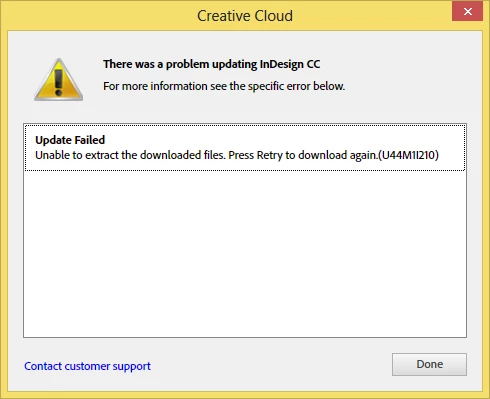
Using the Creative Cloud app, I get this error message:

Update Failed

Unable to extract the downloaded files. Press Retry to download again.

(U44M1|210)

Participant
January 16, 2014

I finally got it. I turned off my virus protection program. I don't know if that was really the problem, but at least it updated.