Participant
October 1, 2017
Answered

Photoshop CS6 appeared error 16 - Unable to reinstall - Please help!!!

  • October 1, 2017
  • 1 reply
  • 685 views

Hi everyone,

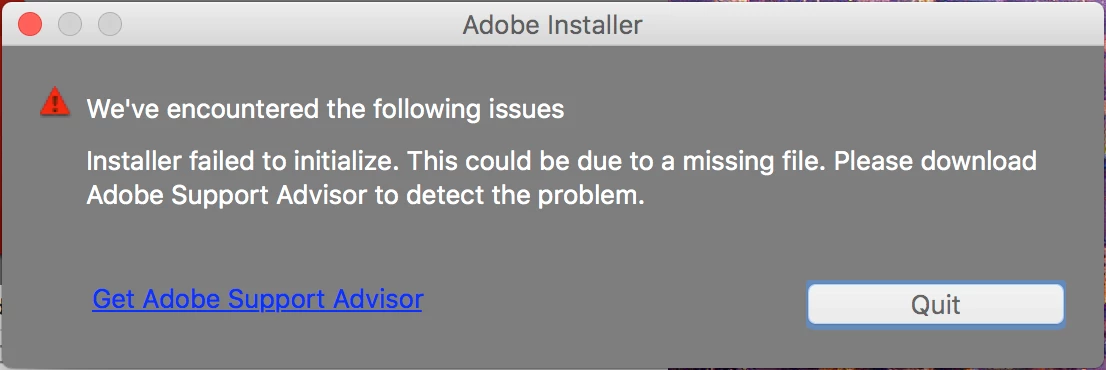
I recently tried to open Photoshop CS6 but it showed error 16 asking me to uninstall the program then reinstall. However, when I reinstall, a problem occurred asking me to download Adobe Support Advisor, which is no longer available.

Can you please help me out?

Thank you and best regards.

GN

This topic has been closed for replies.
Correct answer John T Smith

Code 16 https://forums.adobe.com/thread/2232556

When you ask a question you need to provide some basic information

-Forum quick start https://forums.adobe.com/docs/DOC-5601

Mac or Windows, and EXACTLY which version of the operating system?

Recent Mac AND Windows operating systems have been known to cause "odd" problems

Since you don't say, some notes for both Mac and Windows below

CS6 and earlier programs have not been tested and will not be updated for Mac El Capitan/Sierra

-which means that you try to use CS6 and earlier at YOUR risk of having problems due to Apple updates

-Apple did not maintain backward compatibility with old programs in El Capitan or Sierra

--Adobe has a workaround to Apple's problem of not maintaining backward compatibility

--READ HERE https://forums.adobe.com/thread/2301916 for an Adobe solution to installing old programs, including a link to installing the old Java runtime that is required

Two ideas that MAY work to install and/or run old programs in Windows 10

-RIGHT click the program icon or EXE and select a compatibility mode in the pop up option window

-or Run as Administrator http://forums.adobe.com/thread/969395 to assign FULL Windows permissions may help... says Encore, but sometimes required for ALL Adobe programs (this is NOT the same as using an Administrator account)
1 reply

John T Smith
Community Expert
John T SmithCommunity ExpertCorrect answer
Community Expert
October 1, 2017

Code 16 https://forums.adobe.com/thread/2232556

When you ask a question you need to provide some basic information

-Forum quick start https://forums.adobe.com/docs/DOC-5601

Mac or Windows, and EXACTLY which version of the operating system?

Recent Mac AND Windows operating systems have been known to cause "odd" problems

Since you don't say, some notes for both Mac and Windows below

CS6 and earlier programs have not been tested and will not be updated for Mac El Capitan/Sierra

-which means that you try to use CS6 and earlier at YOUR risk of having problems due to Apple updates

-Apple did not maintain backward compatibility with old programs in El Capitan or Sierra

--Adobe has a workaround to Apple's problem of not maintaining backward compatibility

--READ HERE https://forums.adobe.com/thread/2301916 for an Adobe solution to installing old programs, including a link to installing the old Java runtime that is required

Two ideas that MAY work to install and/or run old programs in Windows 10

-RIGHT click the program icon or EXE and select a compatibility mode in the pop up option window

-or Run as Administrator http://forums.adobe.com/thread/969395 to assign FULL Windows permissions may help... says Encore, but sometimes required for ALL Adobe programs (this is NOT the same as using an Administrator account)

Participant
October 1, 2017

Thank you very much, John!

I'll look at the links. I'm using macOS Sierra Verson 10.12.6. Perhaps this is why I couldn't reinstall photoshop CS6. I'll try following the instruction to install old programs and see if it works.

Thank you and best regards,

GN