
Participant
June 2, 2012
Answered

Photoshop CS6 Subscription (non Extended) Edition not available?

  • June 2, 2012
  • 2 replies
  • 1385 views

Hello,

I have just purchased the Photoshop CS6 Subscription Edition (not the Ps CS6 Extended Version).

However, following the download link under My Orders, I am only offered to download + install the Ps CS6 Extended Version (see screenshot below)
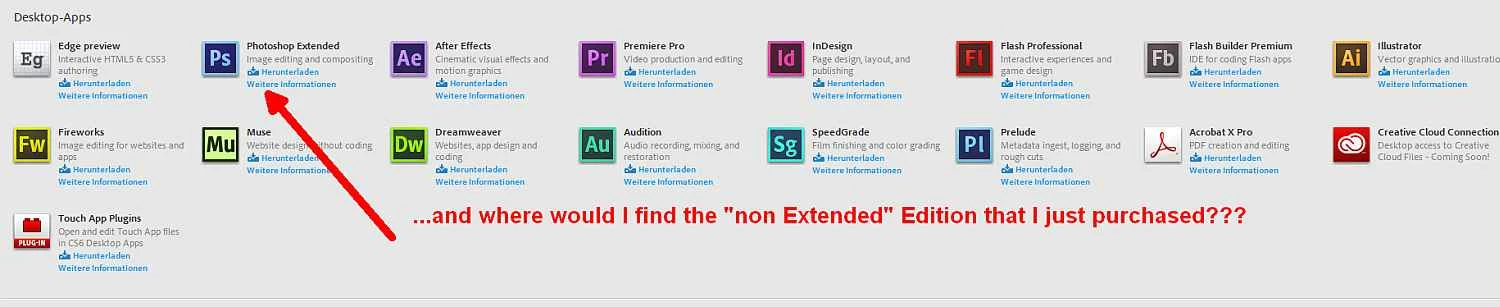
For whatever reason, the Adobe Application Manager does not differ between the Ps CS6 Standard and Extended Versions.

When opening the installed Ps CS6, it comes up in Trial Mode, a Nag Screen asking for Licencing. When using my Adobe ID (used for the purchase), I am prompted with a Serial Number Request.

==> Please advice how I can obtain my purchased product.

Thanks, Frank

This topic has been closed for replies.
Correct answer Mylenium

Get in touch with support.

Mylenium

2 replies

Participant
June 5, 2012

I have the very same issue. I've made a PS CS6 subscription, and downloaded PS CS6 from the Application Manager, but when I start PS I get PS Extended CS6 and promted a Trial screen. Why? How do I switch to normal PS CS6?

Rasmus

Participant
June 5, 2012

Hi Rasmus,

indeed contacting support solved my issue - after 90 min of patience.

Basically (on Win7) the "fix" involved changing your local settings to english, reboot, uninstall all Adobe Photoshop Versions, reboot, Use Adobe Download Manager to download and install Photoshop "Standard" edition.

Then, launch it first time out of Adobe AppliManager.

The splash screen now shows Photoshop CS6 (no more Extended) and the registration is done automatically in the background.

I switched back my locale Win7 setting to non-english and things worked fine. I assume the locale setting change is not really necessary, but do uninstall all Photoshops before you try...

Cheers, Frank

Mylenium
MyleniumCorrect answer
Legend
June 3, 2012

Get in touch with support.

Mylenium