
Participating Frequently
October 5, 2021
Answered

Photoshop Elements 2019 Won't Install on Windows 11 Release

  • October 5, 2021
  • 6 replies
  • 15100 views


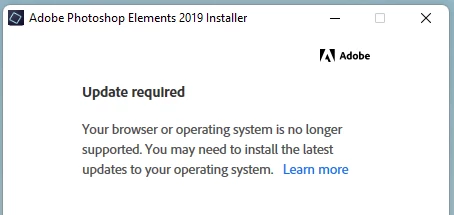
Photoshop Elements 2019 won't install on Windows 11 public release. It thinks I'm using an outdated Windows version. Compatiblity modes don't work. I get the following message consistantly...
 

Correct answer John Waller

Try solution posted at https://community.adobe.com/t5/photoshop-elements-discussions/windows-11/td-p/12433446#M73649


Solution says:

"You need to install Adobe Creative Cloud first. Adobe Creative Cloud download Once you install the cloud desktop, proceed with your Elements install."

6 replies

Participating Frequently
December 14, 2024

I had the same problem and communicated with Adobe Tech Support. The answer I received is shown below in bold. I was trying to download a copy to a new HDD that I installed after the original HDD failed. It is distressing to find out that Adobe will not allow me to load a product I paid for and that was working on my Win 11 laptop just a couple of days earlier. Frankly, it doesn't seem legal.


Adobe Systems Incorporated<Adobe.Tech@outlook.com>
 
To:You
Sat 12/14/2024 2:48 AM
PSE 2019 is no longer available and supported Adobe and 64-Bit system.
So, we provide you the PSE 2024 license and you are eligible for the discount.


kglad
Community Expert
Community Expert
December 14, 2024

@jamesinri 


adobe doesn't prevent you from using pse 2019. 


do you have the installer and your serial number?

Participating Frequently
December 15, 2024

To be clear - Adobe did not prevent me from using PSE 2019 on my Win 11 laptop before the hard drive crashed.

Adobe will not allow me to install PSE 2019 on my new HDD on that same laptop or on my Win 10 backup computer.

williams1672025
Participant
July 2, 2022

None of the cloud stuff worked for us. What did work was downloading the 2021 installer then clicking on start free trial then going back and downloading the 2019 installer

Participating Frequently
August 7, 2022

This worked for me too.  Thank you!  The Creative Cloud solution was a bust, as I could never get Photoshop Elements or Premier Elements to show up as an option.  Woo hoo! Back in business now! :Thanks! :-)

Participating Frequently
August 7, 2022

Sadly, I was mistaken.  This did not work either. It went ahead and installed PSE 2022, which I do not want. 😞

Participating Frequently
November 7, 2021

DISCUSSION CLOSED - Correct solution already given--install Adobe Creative Cloud first before installing Photoshop Elements 2019. Download Creative Cloud 

Participant
February 28, 2022

Tried this. Downloaded Adobe Creative Cloud twice and neither Photoshop Elements 2019 or Premier Elements 2019 will install. 😞

John Waller
Community Expert
Community Expert
February 28, 2022

If you're running a modern Mac with Catalina, Big Sur or Monterey then it will never work due to the 32 bit installer used in Elements 2019. The new Mac operating systems only run 64 bit installers.


Otherwise, this is the first report I've seen in these forums where this has not worked on Windows 10 or 11.


Which operating system? Any error messages?


Have you tried uninstalling everything, including using the Cloud Cleaner Tool. Then tried reinstalling starting with the Cloud desktop app?

https://helpx.adobe.com/photoshop-elements/kb/elements-installation-error-CC-cleaner-tool.html

Participating Frequently
October 13, 2021

Resolved - Installed Adobe Creative Cloud, then resumed Photoshop Elements 2019 setup with success.

Lzito
Known Participant
November 7, 2021

At $52 dollars per month Adobe Creative Cloud is too expensive unless one is doing it professionally.  I want a cheaper option for someone who uses photoshop to tweak photos on occasion. I thought about changing to cheaper or free photo programs, but I like the rectangular marquee for cropping photos.  I have never found another program that has that feature. 

John T Smith
Community Expert
Community Expert
November 7, 2021

If all you use is Photoshop the special photograpy plan is only about $10 per month

John Waller
Community Expert
John WallerCommunity ExpertCorrect answer
Community Expert
October 5, 2021

Try solution posted at https://community.adobe.com/t5/photoshop-elements-discussions/windows-11/td-p/12433446#M73649


Solution says:

"You need to install Adobe Creative Cloud first. Adobe Creative Cloud download Once you install the cloud desktop, proceed with your Elements install."

John T Smith
Community Expert
Community Expert
October 5, 2021

Oh my... so someone who bought the serial number Photoshop Elements because they didn't want to install the Cloud now must go ahead and install the Cloud to be able to use their serial number program

John Waller
Community Expert
Community Expert
October 5, 2021

Yes, I was pretty surprised by that too @John T Smith.


I do wonder why a missing Cloud desktop app triggers a browser/operating system unsupported message from the Adobe installer though. This gets curiouser and curiouser.

John T Smith
Community Expert
Community Expert
October 5, 2021

If that old program won't install you need to tell Microsoft


Adobe did not change the program, so the Microsoft update is the cause of the problem