
Participant
October 13, 2020
Answered

Photoshop Elements 2021 - Installer shows no dropdown-Menues and no Continue-Button

  • October 13, 2020
  • 2 replies
  • 733 views

Hi,


I just bougt the new 2021-version of Photoshop Elements.

The installation is not possible for me, because the installer shows an incomplete window without dropdown-menues and continue button:
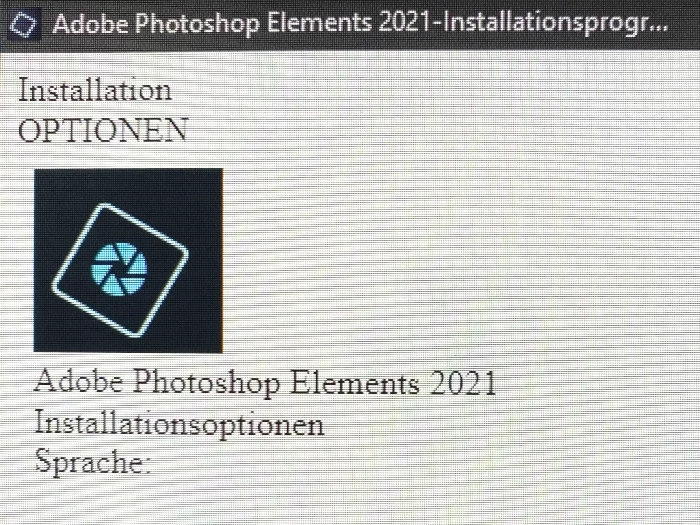
 

It should look like this:
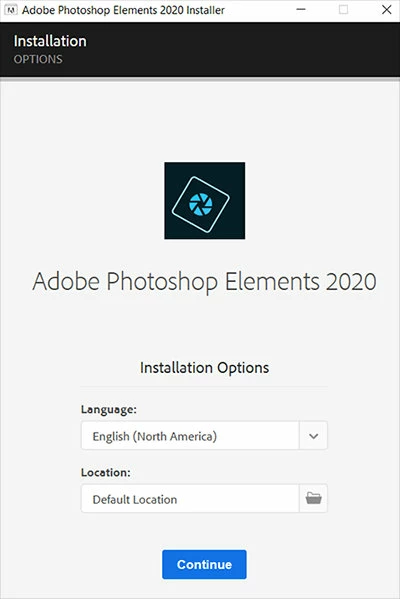


What can I do to solve this problem?

This topic has been closed for replies.
Correct answer Claudia L aus B

I found some help in another forum:

It is possible to navigate with the TAB- and the ENTER-Button within the incomplete window.

2 replies

Claudia L aus BAuthorCorrect answer
Participant
October 15, 2020

I found some help in another forum:

It is possible to navigate with the TAB- and the ENTER-Button within the incomplete window.

Nancy OShea
Community Expert
Community Expert
October 14, 2020

Do you have a newer computer?  Does your computer and OS meet the system requirements?

https://helpx.adobe.com/photoshop-elements/system-requirements.html


Did you buy this directly from Adobe?


Nancy O'Shea— Product User & Community Expert
Participant
October 14, 2020

I bought it directly from Adobe and the computer meets all the requirements.


I downloaded now the complete program (3,9 GB) and using the setup-file in this package has the same effect, the dropdown-menues are still missing and there is no.