



WaterGuy98
Participant
February 5, 2026
Question

Photoshop elements - issue downloading and installing - Installer is corrupt / Sign in error

  • February 5, 2026
  • 2 replies
  • 0 views

Greetings,


We’re trying to install new Elements on Win 11 PRO machine but have issue.

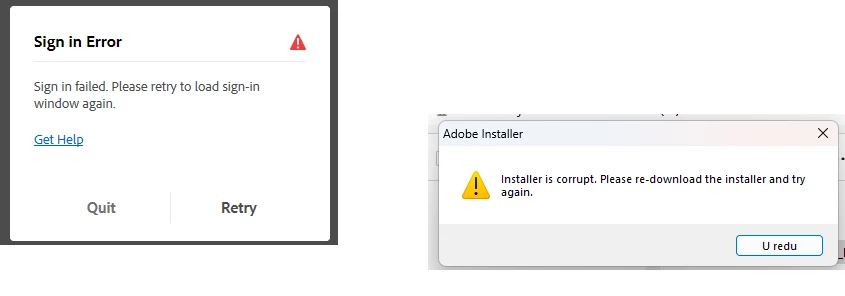
First after downloading the .exe it said it was corrupt so we went and downloaded it on other PC.

After doing that we were was able to start the installer, was prompted for admin info but got “Sign in Error”.


Regards,

WaterGuy98


2 replies

kglad
Community Expert
Community Expert
February 5, 2026

@WaterGuy98 


did you suspend win defender when trying to sign in?

what pse version are you trying to install?

hazar11
Participant
February 5, 2026

This sounds like a classic checksum mismatch or a network-level handshake failure during the Adobe background process.

When the installer reports as "corrupt," it’s often because the file’s hash doesn't match the original due to an interrupted packet stream—Win 11 Pro’s advanced firewall and "SmartScreen" can sometimes kill these streams mid-way. The subsequent "Sign in Error" is usually a TLS/SSL certificate issue or a credential manager conflict where the installer fails to authenticate with the Adobe servers through the local OS.

I’ve dealt with similar deployment hurdles on high-traffic utility sites like https://8bpoolproapk.com/, where we have to ensure large APK/EXE files maintain integrity across different global CDNs.

Here is a quick technical checklist to resolve this:

  1. Clear OOBE/AAMUpdater folders: Sometimes cached session data in the AppData/Local folder forces a sign-in loop.

  2. Toggle Windows Sandbox: If you can’t get it to run on the main OS, try running the installer in the Windows Sandbox to see if a specific Pro-level Group Policy is blocking the auth-token.

  3. Manual Hash Verification: Use the Get-FileHash command in PowerShell to ensure the installer is actually 100% complete before executing.

If the file keeps reporting as corrupt even after a fresh download, you might need to check your DNS settings, as some ISPs interfere with the specific ports Adobe uses for authentication.