Participant
October 27, 2021
Answered

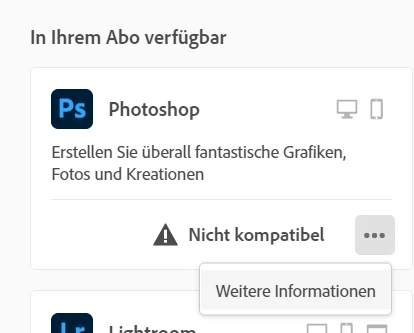
Photoshop nicht kompatibel

  • October 27, 2021
  • 1 reply
  • 602 views

Hallo, ich würde gerne eine ältere Version von Photoshop installieren, da die aktuelle nicht mit meiner Hardware kompatibel ist. Allerdings wird die Option "ältere Versionen" nicht mehr angezeigt. Was kann ich machen?


This topic has been closed for replies.
Correct answer kglad

from jim@prodesigntools.com:


UPDATE (Nov. 27th) – Great news! Adobe has not posted the new Creative Cloud 2020 direct download links; however, as of today, you can now actually get them yourself by contacting Customer Service…

Just reach out to Adobe’s Customer Care team via live online chat, and they will immediately give you temporary links to download offline installers for all the 2020 apps that you need.

 

You simply need to ask. We suggest: “Hello, I need the direct download links (offline installers) for the new 2020 releases of ___________. Could you please help me?”

You can connect with an agent to get the downloads here. Look for “Contact Us” or “Your contact options…” at the bottom of the page, or the Chat icon at the lower right. If asked, choose the “Download & Install” category. That’s it!


1 reply

John T Smith
Community Expert
Community Expert
October 27, 2021

I do not know how far back this process will go, but try...
Direct Download Links https://prodesigntools.com/tag/ddl MAY help
-you MUST do what it says in Note: Very Important Instructions
-https://prodesigntools.com/adobe-cc-2015-direct-download-links.html#download-instructions
-the prodesign links go directly to Adobe's file server, so this process will
--only work until Adobe completely removes the old version(s) from the server
.
IF/When you do have a download, be sure to copy it to AT LEAST one external device
-since Adobe does sometimes remove old versions from the server
-a usb flash drive or external hard drive, or write to a DVD

Participant
October 28, 2021

Before I resetted my computer I had the Photoshop Version 2020 and it worked. Can you provide me with a download link to download the 2020 version please?

kglad
Community Expert
kgladCommunity ExpertCorrect answer
Community Expert
October 28, 2021

from jim@prodesigntools.com:


UPDATE (Nov. 27th) – Great news! Adobe has not posted the new Creative Cloud 2020 direct download links; however, as of today, you can now actually get them yourself by contacting Customer Service…

Just reach out to Adobe’s Customer Care team via live online chat, and they will immediately give you temporary links to download offline installers for all the 2020 apps that you need.


You simply need to ask. We suggest: “Hello, I need the direct download links (offline installers) for the new 2020 releases of ___________. Could you please help me?”

You can connect with an agent to get the downloads here. Look for “Contact Us” or “Your contact options…” at the bottom of the page, or the Chat icon at the lower right. If asked, choose the “Download & Install” category. That’s it!