jasonvp
Inspiring
May 7, 2012
Answered

Premiere Pro 6 on Mac: Installation Damaged

  • May 7, 2012
  • 3 replies
  • 5514 views

Greetings -

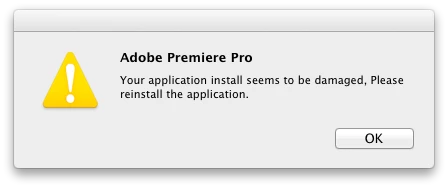
I just downloaded and installed PPro 6 on my Mac (Lion 10.7.3).  When I start Premiere, I get a dialog that pops up and says that the installation is damaged and I should reinstall the app.  I've done that, but I continue to get that same dialog:

It appears Premiere is running OK other than that dialog.  But I'm not 100% sure yet.  Thoughts?

Thanks!

jas

This topic has been closed for replies.
Correct answer jasonvp

Jeff -

Jeff A Wright wrote:

at this point I would recommend contacting our support team.

Thanks for your patience, time, and help with this.  In looking through the PDApp.log file that you mentioned, I could see that the Adobe Application Manager got munged somehow.  Specifically the pim.db.  I nuked the entire Application Manager, re-installed it, and that allowed me to then install Premiere.

I'm in contact with your support team (via phone).  We did the Adobe Connect thing so they could watch my screen while I re-installed Premiere (again) and ran it.  Sure enough the "Your installation is damaged" error popped up, and they're classifying it as a possible bug.

If they come back with a more certain answer, I'll update this thread.  Thanks again!

jas


Jason Van Patten wrote:

I'm in contact with your support team (via phone).  We did the Adobe Connect thing so they could watch my screen while I re-installed Premiere (again) and ran it.  Sure enough the "Your installation is damaged" error popped up, and they're classifying it as a possible bug.

Well, I solved the problem, but not in the way I'd hoped to.  Apparently there were a bunch of things written all over the OS by various pieces of Adobe software, to the point of making it very hard to install new.  I also had a lot of trouble installing and using Photoshop CS6 for the same reasons.

Answer: Format and re-install the OS.  And that, IMHO, is a very bad thing to have to do.  But, it's done.  PPro and Photoshop both installed and they both run without any errors.

Dammit.

jas

3 replies

Participant
January 29, 2013

Hi, I managed to fix the problem without reinstalling the system OS. If anyone is still suffering this issue  go to (hard disk name)/Library/Application Support/Adobe. Inside this folder there should be a folder titled OOBE. Inside that folder there should be an alias called PDApp which points to the PDAppFlex-app.xml and PDAppFlex.swf items located in (hard disk name)/Applications/Utilities/Adobe Application Manager. If the OOBE folder is not there or the alias inside it is aiming somewhere else, this could be the source of the problem.

Cheers,

Dan

Jeffrey_A_Wright
Community Manager
Community Manager
May 7, 2012

Beyond the error message at launch did you receive any other notifications regarding an installation failure?  Could you please try running the Adobe Support Advisor - http://www.adobe.com/support/loganalyzer/ to see if it detects any problems with the installation?

Mylenium maybe right that it is something more Premiere specific but since this is a new release just want to verify there isn't anything we can do regarding the installation of the software.

jasonvp
jasonvpAuthor
Inspiring
May 7, 2012

As noted in another thread in the Premiere Pro section: the Akamai installer never finished installing, and then gave up and stopped.  Instead, I downloaded the Premiere Pro DMG file directly, and installed using that.  The issue with the Akamai thing was the only problem I ran into during the install.

The log analyzer application never gets past 50% while scanning "Creative Suite Product Install".  It just sits there with no disk activity, nor CPU use, nor anything.

jas

Jeffrey_A_Wright
Community Manager
Community Manager
May 7, 2012

Jason Van Patten please quit out of the Adobe Support Advisor and then delete the contents of /Library/Logs/Adobe/Installers/.  I would also recommend trying to run the uninstaller located in Applications/Utilites.  After that is complete please also run the cleaner tool located at http://www.adobe.com/support/contact/cscleanertool.html.

This should remove what is currently installed on your system.  You mentioned you were using Akamai to download the software?  Do you have a volume license or retail license?

Participating Frequently
May 7, 2012

I had the same problem. Removing all Adobe installs and cleaning didn't help, I now can't even install it to that point. Now its worse!

Mylenium
Legend
May 7, 2012

Perhaps ask in the Premiere forums... Sounds like one of those many language related issues on Macs.

Mylenium