



wza360
Participant
January 25, 2021
Question

Privacy concerns related to amount of services and amount of calls beind done in background

  • January 25, 2021
  • 1 reply
  • 509 views

Dear Adobe community,


I would like to discuss this with more experienced members around here. As privacy concerns are raising around the world this might be an issue for some people more than for other.


Using macOS Big Sur and latest Adobe cloud and apps on Intel based macbook pro.

Problem is following - when I am not actively using any Adobe apps, I keep every app, incuding Creative Cloud, swithced off (meaning not running). I am fine with apps calling adobe services online when I am using apps, but when I am not using them, I would expect everything to be off (or at leat mostly off).

What I am experiencing on the other side, just in 10minutes of time, while none of Adobe apps are running, bunch of Adobe servers are being called from various servervices. And it keeps going forever as long as computer is on.

I've contacted support and they said that they need "some services" running to make sure that lincense are ok etc, they were very kind helping me to switch of some automatic updates via Creative Cloud app, and explained that others have to run. Would be fine with me when at least some apps are running, but it's constantly ongoing process.


Screenshot attached
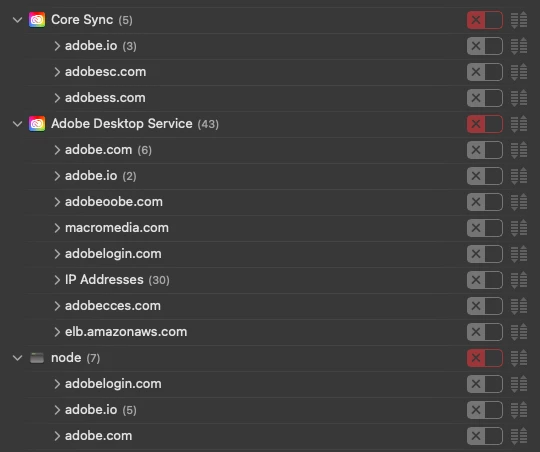


Any ideas?


Thanks,

Justas

This topic has been closed for replies.

1 reply

wza360
wza360Author
Participant
January 25, 2021

15 minutes later (still no Adobe app was launched)


Jeffrey_A_Wright
Community Manager
Community Manager
January 25, 2021

Wza, thanks for your concern. Please see https://helpx.adobe.com/x-productkb/global/adobe-background-processes.html for information about what the Adobe Creative Cloud related background processes are doing.  You can also find a complete list of the servers necessary to use the apps and services included with an individual membership at https://helpx.adobe.com/enterprise/kb/network-endpoints.html.


Please look into a Creative Cloud for Enterprise or Team membership if you want to restrict access to servers or services.  Both memberships provide additional flexibility regarding server access and disabling services.

wza360
wza360Author
Participant
January 25, 2021

I understand we can't take it very general, as there are too many services to take it all together at once. Lets take Adobe Desktop Service, it says in the link provided  (quote):


Adobe Desktop Service

Adobe Desktop Service is the core of the Creative Cloud apps and keeps them running. It is responsible for fetching and processing critical information such as the licenses that you have, apps available in your subscription, and updates required.


So, what is so critical to keep calling every few minutes more than 10 different urls and more than 30 different IP addresses? I don't get it. Just in case my lincese expires in next  5minutes while I am not using any Adobe apps? (excuse my sarcasm please. just want to paint a picture)


You might think I am picky, but I think this might need a reviewed to make sure people don't start getting paranoid, like it happened with some social services.